

Core Web Vitals turn into numbers three questions every visitor asks: does the page load quickly, does it respond when I click, and does it stay stable while I'm reading? These metrics are defined by Google and documented on web.dev. They are measured with real Chrome users, not just in the lab.
The three metrics and their thresholds
- LCP (Largest Contentful Paint): the render time of the largest element visible on load, often the featured image or the first block of text. Good at 2.5 seconds or less, poor above 4 seconds.
- INP (Interaction to Next Paint): the delay between an interaction (click, tap, key press) and the next paint, observed over the whole visit. Good at 200 milliseconds or less, poor above 500. INP replaced the former FID metric on March 12, 2024.
- CLS (Cumulative Layout Shift): how much the layout shifts unexpectedly, like a button that moves just as you click it. Good at 0.1 or less, poor above 0.25.
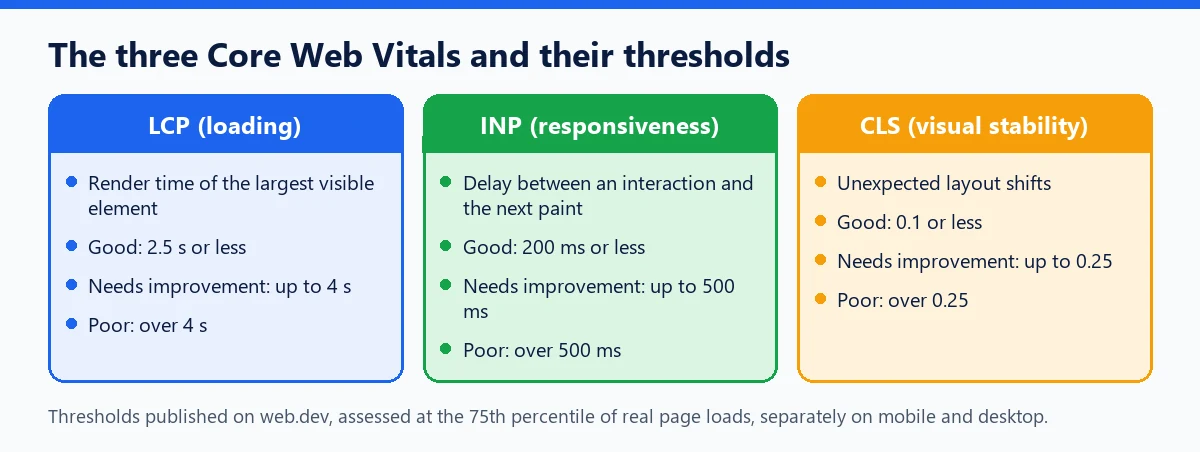
The values are assessed at the 75th percentile of page loads, separately on mobile and desktop: it isn't enough for the page to be fast for half of your visitors, it has to be fast for three out of four.
How much do they weigh in rankings?
Google says Core Web Vitals are used by its ranking systems, but adds that there is no single page experience signal and that good scores don't guarantee good rankings. Relevant content remains decisive; with equivalent content, a fast and stable page offers a better experience and converts better. Our article on what Google really takes into account among HTTPS, headers and performance puts these signals in perspective.
Measuring them
The Core Web Vitals report in Search Console groups URLs by status based on real Chrome data. PageSpeed Insights shows that field data for a given URL when it exists, followed by a lab diagnosis. A low-traffic site may not have enough visits to get field data: the lab test is then the only benchmark.
For WordPress
- LCP: page caching, fast hosting and a CDN for static files often make the biggest difference. Since WordPress 6.3, core adds
fetchpriority="high"to the image most likely to be the LCP element and avoids lazy-loading it. - INP: every third-party script (chat, ads, tracking, a page builder loaded everywhere) keeps the browser busy. Disable whatever isn't needed on the page in question.
- CLS: images without dimensions, banners inserted at the top of the page and web fonts that replace the fallback font late are the most common causes.
Security and performance
Security measures affect these metrics. A chain of redirects delays rendering, a heavy protection script can hurt INP, and a full-page bot challenge gets in the way of legitimate visitors. Conversely, blocking malicious bots early frees up server resources. If you use WP Feint, check its compatibility with hosts and caching plugins: after any change to a security setting, a cache that wasn't purged properly is a common source of inconsistent pages, and the metrics should be checked again.