

Being online isn't enough to be found. Between publishing a post on WordPress and seeing it appear in Google, several steps have to succeed, and indexing is the one that decides whether the page makes it into the search engine's catalog. Understanding what happens at that stage saves a lot of worry when you look at Search Console.
How indexing works
Google describes three stages: crawling (the crawler downloads the page), indexing (it analyzes and stores it) and serving search results. During indexing, it reads the text, the title tag, alt attributes, images and videos. It also spots identical or very similar pages, groups them and picks one of them as the canonical URL, the one that may be shown in the results. Finally, it collects signals such as the language or the targeted country.
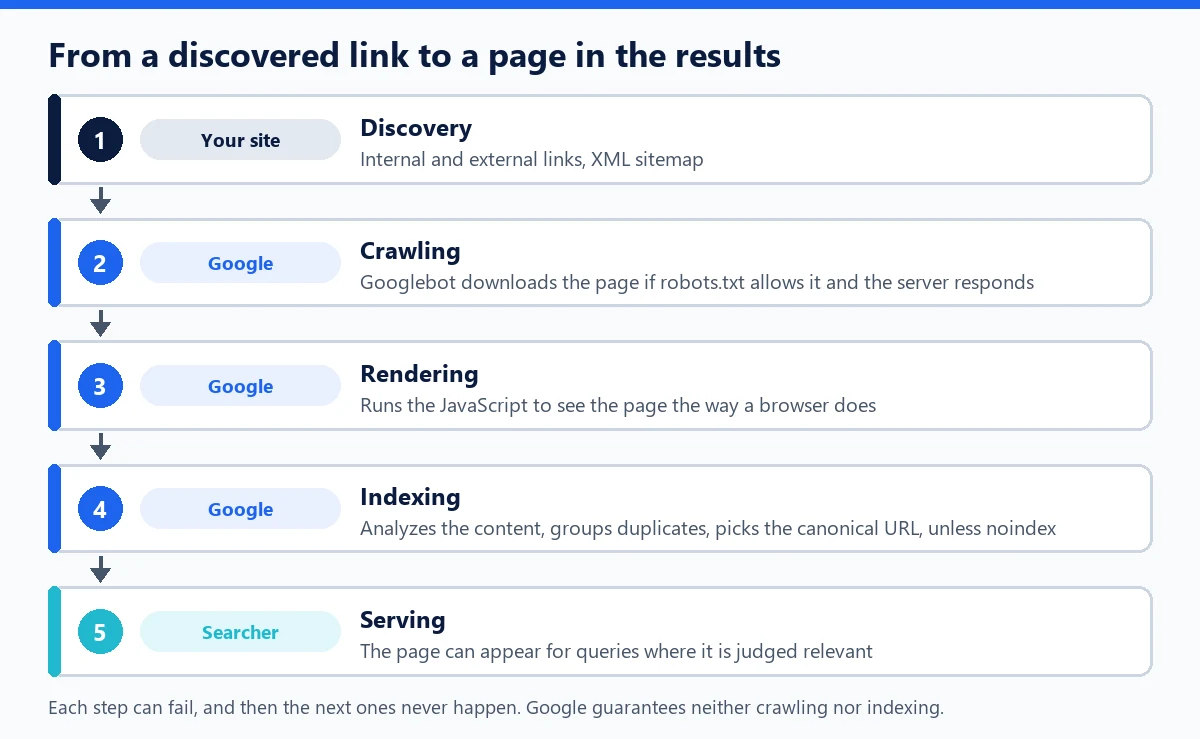
A key point: Google itself states that indexing isn't guaranteed. Not every page it processes is kept, and an indexed page may never be shown if it is judged irrelevant or low quality.
Crawling vs. indexing: two different controls
The two concepts are often confused, even though they are controlled with separate tools:
- The robots.txt file prevents crawling, not indexing. A blocked URL can stay in the index if other sites link to it, just without a description.
- The
noindexrule (robots meta tag or X-Robots-Tag header) prevents indexing, provided the crawler can crawl the page to read it. - The XML sitemap helps Google discover pages, without forcing it to index them.
For WordPress
- Settings > Reading: the “Discourage search engines from indexing this site” checkbox adds a noindex rule to the whole site. Useful on a staging site, disastrous if it stays checked after launch.
- Sitemap: since WordPress 5.5, core publishes
/wp-sitemap.xmland announces it in the virtual robots.txt. SEO plugins often replace it with their own. - Search Console: the Page indexing report lists excluded URLs with their reason (“Discovered - currently not indexed”, “Crawled - currently not indexed”, noindex, duplicate…). The URL Inspection tool shows the version Googlebot sees.
When the index fills up with pages that aren't yours
A sudden jump in the number of indexed pages isn't necessarily good news. On a hacked site, thousands of spam pages can be injected and indexed under your domain, sometimes invisible from your own browser. They dilute the crawling of your real pages and can earn you a warning in the search results. Our article on SEO spam and deindexing after a hack explains how to spot them and get them out of the index. Conversely, an unexpected drop calls for checking noindex rules, server errors and duplicate content, and, on very large sites, crawl budget.