

Between the disclosure of a vulnerability and the installation of the fix on your site, there is always a delay: the developer hasn't released a patched version yet, the update breaks a feature, or nobody has had time to test it. Virtual patching (some vendors call it a “vPatch”) is meant to bridge that gap. OWASP describes it as a policy enforcement layer that detects and blocks attempts to exploit a known vulnerability, without removing the flaw itself.
How virtual patching works
Once the vulnerability has been analyzed (vulnerable parameter, affected versions, exploitation conditions), a rule is written that recognizes the dangerous requests for that specific case. There are two approaches:
- Positive model (allowlist): you define what a valid value is for the targeted parameter, for example an integer, and everything else is rejected. It is the most robust, but it requires manual work.
- Negative model (blocklist): you block known attack patterns. Faster to deploy, but easier to bypass with a different encoding.
OWASP recommends testing the rule in logging mode before blocking, avoiding rules that only match the exact payload published in the advisory, and removing the virtual patch once the code is fixed.
Where it is applied
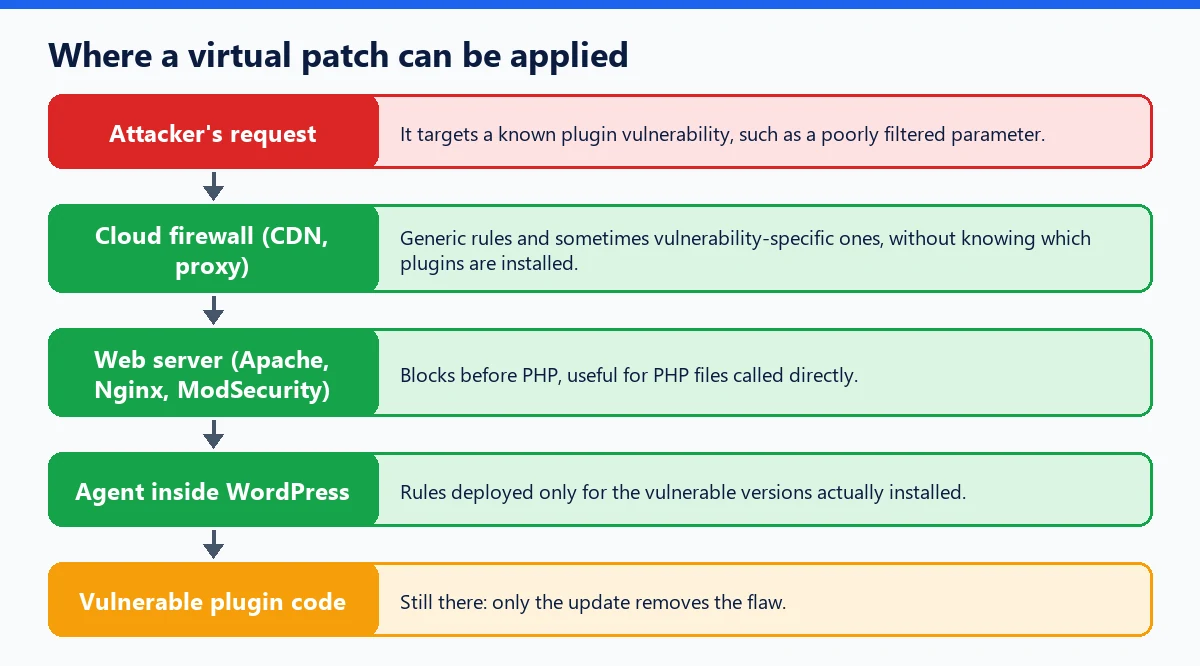
A virtual patch can be applied at several points along a request's path: by a cloud-based web application firewall, by the web server (ModSecurity on Apache or Nginx), or by an agent installed inside the application. For WordPress, Patchstack deploys its rules only for the vulnerable components actually installed on the site, based on its inventory of versions, and runs them inside the application or, depending on the vulnerability, as early as Apache or Nginx.
When it is useful
- A vulnerability is disclosed with no patched version, or the developer is slow to respond.
- A plugin is no longer maintained but the site still depends on it: a situation that needs fixing, as our article on abandoned plugins explains, but not one you can fix overnight.
- You manage many sites and updates go through a staging environment first.
- A vulnerability is exploited at scale a few hours after disclosure, faster than your maintenance cycle.
For WordPress: tools and limitations
Patchstack (in its paid plans), Wordfence and cloud firewalls such as Cloudflare publish rules for known WordPress vulnerabilities, with different turnaround times and models; our firewall comparison covers these differences. A few limitations to keep in mind:
- A rule only exists once the vulnerability is known: against a zero-day vulnerability, there is nothing to deploy.
- Coverage depends on the vendor's database, which is often thinner for premium plugins sold outside wordpress.org.
- A request that isn't inspected (for example an attack that doesn't go through the firewall) isn't protected.
WP Feint is not a firewall and doesn't apply virtual patches. It works upstream and alongside: it makes your plugins harder to inventory from the outside, and its vulnerability alerts tell you which installed plugin is affected by a CVE and in which version it is fixed. Pairing it with Patchstack shows how to split the roles between the two.