
The same content is often reachable at several URLs without anyone intending it: with and without www, over http and https, with tracking or sorting parameters, as a printable version. For the search engine, these are separate pages with identical content. Rather than showing them all, Google groups them and picks one, the canonical page; the others are treated as duplicates and crawled less often. What's at stake for you: making sure the version it keeps is the one you want to see in the results.
How to specify the canonical URL
Google describes several signals of varying strength:
- A permanent redirect: a strong signal, to use when the old URL no longer has any reason to exist (moving to HTTPS, choosing the domain with or without
www). - The
rel="canonical"tag in the HTML head, or the HTTPLinkheader for a PDF: a strong signal, when the variants need to stay accessible to visitors. - Inclusion in the sitemap: a weak signal, but one that points the same way.
<link rel="canonical" href="https://example.com/guide/">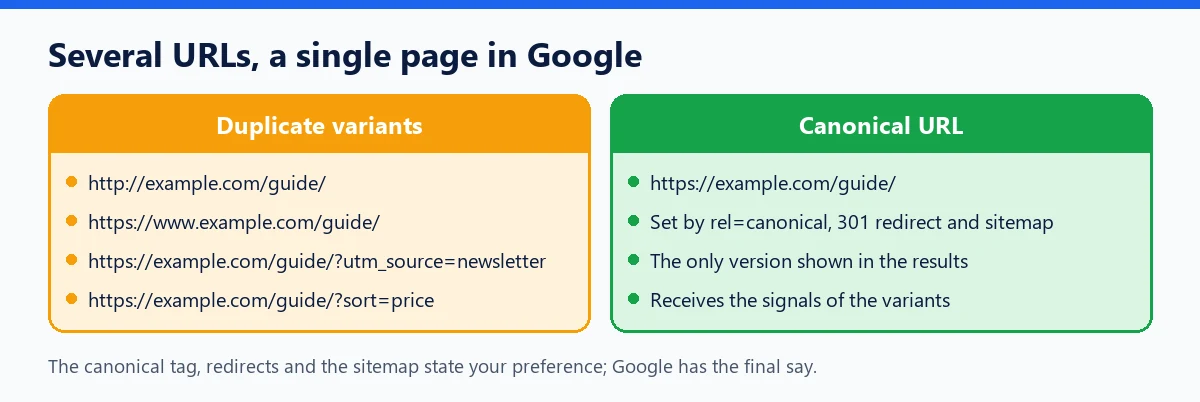
A key point: Google reminds us that your stated preference is a hint, not a rule. If your signals contradict each other (canonical pointing to A, sitemap and internal links pointing to B), it may choose a different URL from yours. The URL Inspection tool in Search Console shows both the user-declared canonical and the one Google selected.
Best practices
- An absolute URL in the tag, with the protocol and domain.
- A self-referencing canonical on the canonical page itself, pointing to its own URL.
- A single markup method: the HTML tag or the HTTP header, not both.
- Consistent signals: internal links, the sitemap and hreflang tags should all point to the canonical URLs.
- No robots.txt to handle duplicates, and no
noindexto choose the canonical within a site: Google explicitly advises against both.
The broader issue of identical or very similar pages is covered in our definition of duplicate content.
For WordPress
WordPress automatically adds a canonical tag to individual content (posts, pages, custom post types), a feature that has existed since version 2.9. It doesn't do so for archives, categories or the posts page: SEO plugins fill that gap and let you set a custom canonical for a given page, which is useful when an article is republished elsewhere. Also check that the site address (Settings > General) uses the right protocol and domain: it is the basis for the generated canonicals.
Changing the URL of technical files or masking WordPress doesn't affect the URLs of your content, and therefore not their canonicals either. Special cases, such as images served from a different URL, are covered in our article on masking and SEO.