

Everything in a WordPress site that isn't a file lives in the database: content, menus, plugin settings, user accounts, comments, WooCommerce orders. PHP queries it in SQL every time it generates a page. WordPress works with MySQL or MariaDB and currently recommends MySQL 8.0 or later, or MariaDB 10.11 or later.
MySQL and MariaDB: what's the difference?
MySQL is the original system, now developed by Oracle. MariaDB was started by original MySQL developers; the MariaDB Foundation presents Michael “Monty” Widenius, former CTO of MySQL AB, as its spiritual father, and is committed to keeping MariaDB Server open source under the GPLv2 license.
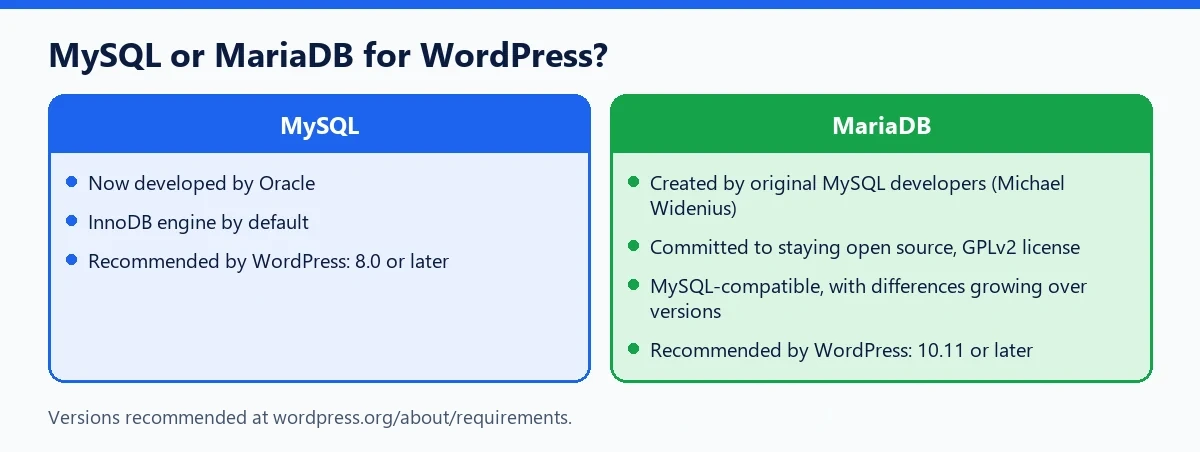
MariaDB was designed as an enhanced, compatible replacement for MySQL. Its documentation acknowledges, however, that implementation differences grow with each release: JSON types, replication, functions and system variables diverge. For WordPress, which uses plain SQL, the two are equivalent; to migrate a server from one to the other, a full backup and a test run beforehand are still essential.
How WordPress uses the database
Tables carry a prefix, wp_ by default: wp_posts for content, wp_postmeta for its associated data, wp_options for settings, wp_users for accounts. The connection credentials are stored in wp-config.php:
define( 'DB_NAME', 'database_name' );
define( 'DB_USER', 'username' );
define( 'DB_PASSWORD', 'password' );
define( 'DB_HOST', 'localhost' );
DB_HOST is most often localhost, but not always: some hosts put the database on another server, and a port or socket can be added after a colon. Tables use the InnoDB engine, MySQL's default, which brings transactions, row-level locking and crash recovery. The WordPress documentation advises converting old MyISAM tables to InnoDB.
Security
- One user per site, with all privileges on its own database and none on the others. In a control panel like cPanel, the database wizard offers this directly.
- No unnecessary remote access: the database port (3306 by default) shouldn't be open to the internet.
- A strong, unique password, protected in a wp-config.php file with restricted permissions; our article on wp-config.php security settings covers the right choices.
- Plugin code: queries built without $wpdb->prepare() open the door to SQL injection, one of the most serious vulnerabilities a site can have.
For WordPress
- Back up the database separately from the files and test the restore: the database changes with every comment or order. The 3-2-1 backup strategy applies to it too.
- With WP-CLI,
wp db exportproduces an SQL copy in one command; never leave it in a public folder. - Keep an eye on the size of autoloaded options in wp_options: deleted plugins often leave data behind there that is read on every page.
- On a busy site, a persistent object cache cuts the number of queries sent to the database.
Common mistakes
Using the database root account for WordPress, keeping a MySQL or MariaDB version that no longer receives patches, leaving the database out of backups, or exposing phpMyAdmin without protection, a favorite target of scanning bots.