

The word cloud gets attached to almost every hosting offer. The reference definition is still the one published by the US National Institute of Standards and Technology (NIST) in 2011: a model that provides on-demand network access to a shared pool of configurable resources (networks, servers, storage, applications) that can be rapidly provisioned and released with minimal management effort.
The five characteristics of cloud computing
NIST lists five essential characteristics:
- On-demand self-service: you create a server or storage space yourself, with no human interaction on the provider's side.
- Broad network access: resources can be managed from any device, through a web console or an API.
- Resource pooling: the infrastructure serves many customers, and you generally don't know which specific machine your service runs on.
- Rapid elasticity: capacity scales up or down with demand, sometimes automatically.
- Measured service: usage (compute, storage, bandwidth) is metered, which allows pay-as-you-go billing.
IaaS, PaaS, SaaS
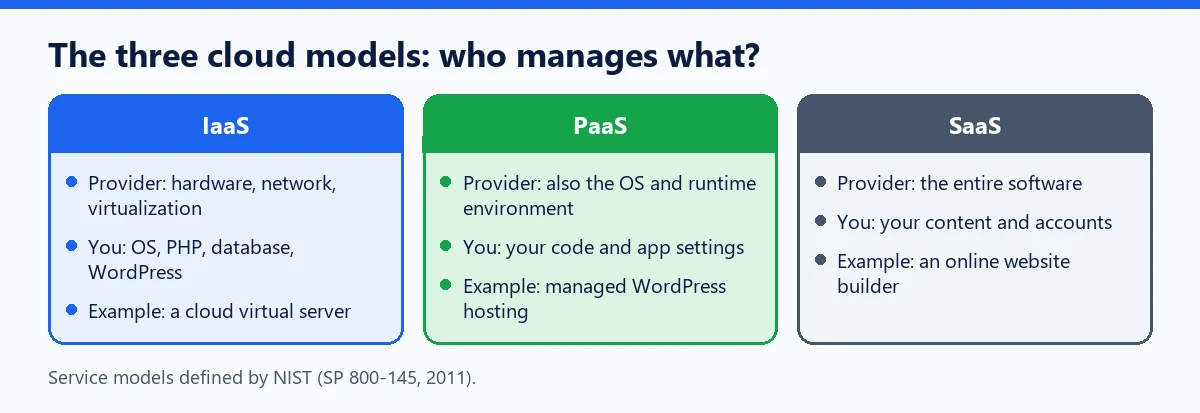
In practice, a cloud virtual server looks a lot like a traditional VPS; the difference lies in usage-based billing, the API and the services around it (object storage, managed databases, load balancing). “Managed” WordPress plans are closer to PaaS: you don't administer the system, only the site.
For WordPress
The cloud makes it possible to spread a site across several servers, as long as you follow a few rules:
- Shared files: the wp-content/uploads folder must be common to all servers (shared or object storage), otherwise an image uploaded to one is missing on another.
- Shared object cache: a common Redis or Memcached instance keeps each server from holding its own version of the cached data.
- Static content: a CDN serves images and CSS or JavaScript files as close to visitors as possible.
- Backups: the provider's snapshots are convenient, but a copy outside your account is still essential, as the 3-2-1 backup rule reminds us.
Personal data and location
With the cloud, you often don't know where your data physically lives. For a site that handles personal data of people in the European Union (accounts, orders, forms), the provider acts as a processor under Article 28 of the GDPR: a contract must govern the processing, security and what happens to the data when the service ends. Also check the hosting region you selected; our article on the GDPR applied to WordPress security covers logs and retention periods.
Common mistakes
Assuming the cloud is backed up or secured by default: the provider protects its infrastructure, not your WordPress install. Another trap is poorly controlled elasticity: without a spending cap, a traffic spike or an attack can drive up the bill. Finally, a site that needs steady, predictable performance sometimes finds a better balance on a dedicated server.