
Machines communicate with IP addresses; humans remember names. DNS links the two, and does much more: it also says where to deliver a domain's mail, which services are allowed to send email on its behalf and which certificate authority may issue it a certificate. It has been defined since 1987 by RFC 1034 and 1035, still in force along with many later additions.
How DNS works
The namespace forms a tree, read from right to left: the root, then the top-level domain (.com, .org), then example.com, then www.example.com. RFC 1034 distinguishes two roles. Name servers hold the information, split into zones they are responsible for (they are said to be authoritative). Resolvers go and fetch that information on behalf of clients.
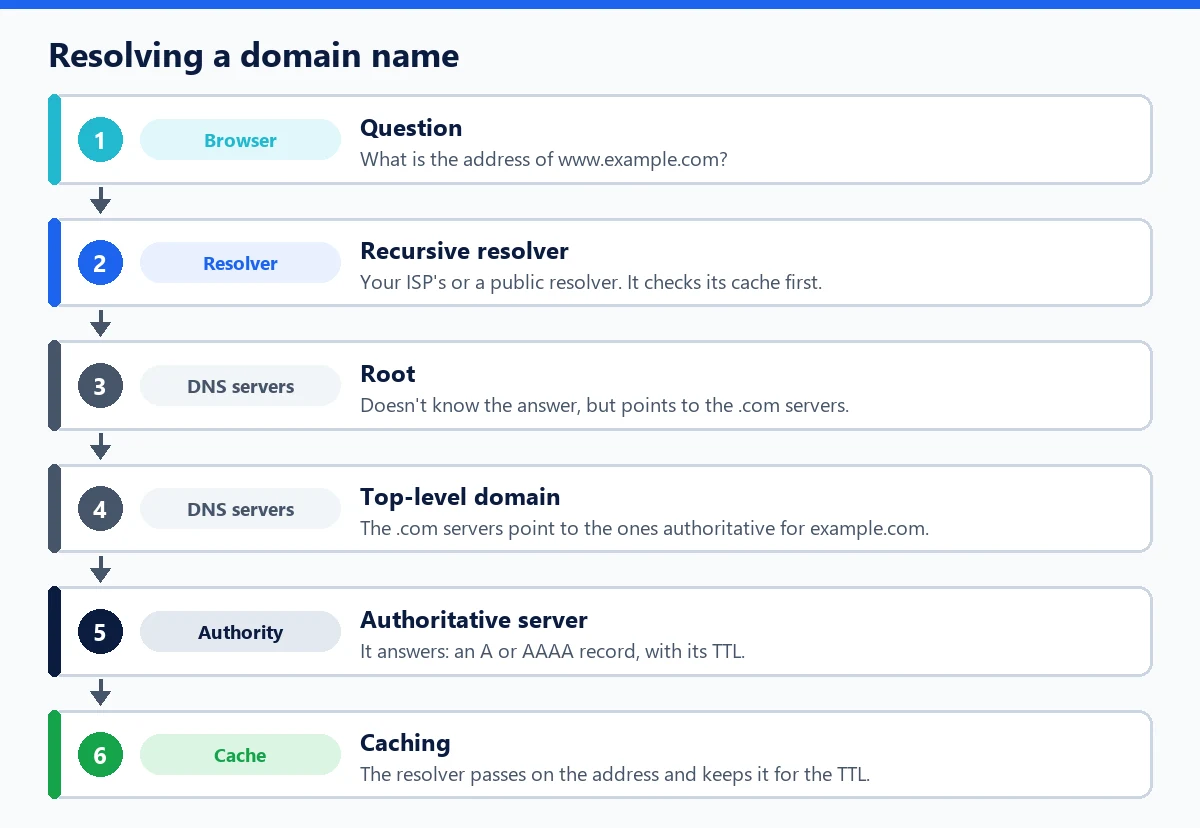
Your computer sends its question to a recursive resolver, either your internet provider's or a public resolver. The resolver queries the chain of servers, following one referral after another, until it gets the answer, then caches it. Every record carries a TTL, the length of time it may be kept: that's what makes the system fast, and also why a change isn't visible everywhere right away.
Records worth knowing
- A and AAAA: the IPv4 and IPv6 addresses of the server hosting the site.
- CNAME: an alias to another name, common for the www subdomain or for a content delivery network.
- MX: the servers that receive the domain's mail.
- TXT: free-form text, used by SPF, DKIM, DMARC and ownership checks (Google Search Console, for example).
- NS and SOA: the servers that are authoritative for the zone, and that zone's settings.
- CAA: the list of certificate authorities allowed to issue a certificate for the domain.
For WordPress
- Switching hosts comes down to changing the A and AAAA records. Lower the TTL a day or two beforehand so the switchover takes effect quickly.
- Moving behind a proxy such as Cloudflare means handing the zone over to its nameservers: the domain then points to its addresses, as explained in our article Cloudflare in front of WordPress.
- Getting a certificate: Let’s Encrypt checks that the domain really points to your server, or reads a TXT record placed in the zone for wildcard certificates. The full move to HTTPS is covered in our guide HTTPS on WordPress.
- Secure your registrar account (unique password, two-factor authentication): whoever can change your DNS can hijack the site and the email without touching WordPress.
Common mistakes
Forgetting an old server's AAAA record after a migration, which sends some IPv6 visitors to the old machine; deleting an MX record when changing nameservers; leaving a CNAME pointing to a canceled service, which a third party could claim to take over the subdomain.