

The name comes from the Greek chronos, time. On a Linux server, the cron daemon reads job tables and runs each command at its scheduled time: a nightly backup, renewing a Let’s Encrypt certificate, cleaning up temporary files. WordPress needs the same kind of service, but it can't count on access to the system cron, which some hosting plans don't provide. So it has its own mechanism, WP-Cron.
Crontab syntax
Each line starts with five fields: minute (0 to 59), hour (0 to 23), day of the month (1 to 31), month (1 to 12) and day of the week (0 to 7, where both 0 and 7 mean Sunday), followed by the command. An asterisk means “every,” and */15 in the minute field runs the job at minutes 0, 15, 30 and 45.
*/15 * * * * command-every-15-minutes
0 3 * * * command-every-night-at-3am
How WP-Cron works
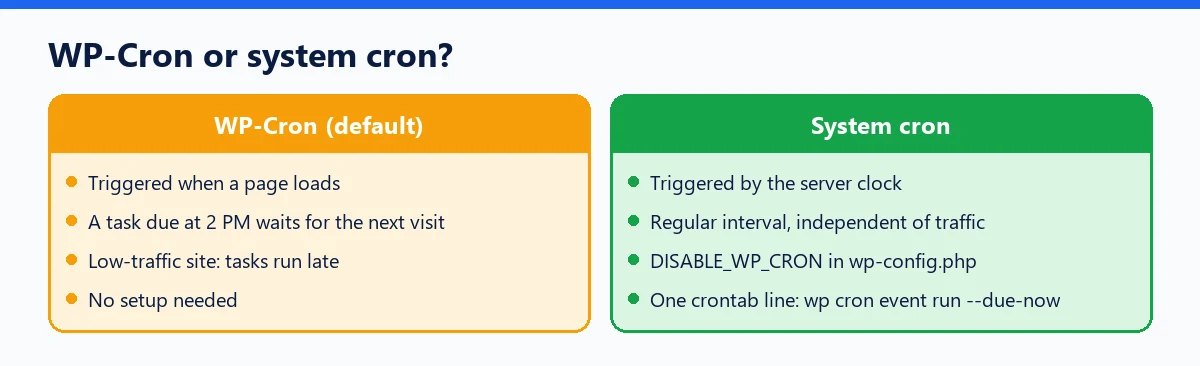
According to the WordPress documentation, WP-Cron checks the list of scheduled tasks on every page load and runs the ones that are due. The default intervals are hourly, twicedaily, daily and weekly; plugins add others. This design has two consequences. If nobody visits the site, nothing runs: a task scheduled for 2:00 PM may wait until 5:00 PM, as the documentation points out. It isn't lost, though; it runs on the next visit. Conversely, on a busy site, the check happens constantly.
This covers publishing scheduled posts, update checks and automatic updates, plugin backups, sending newsletters and security reports.
Switching to the system cron
The approach recommended by the documentation is to turn off visit-based triggering in wp-config.php:
define( 'DISABLE_WP_CRON', true );and then let the server's cron do the triggering, either with a request to wp-cron.php or, if your host provides WP-CLI, with a command that runs every due task while avoiding overlapping runs:
*/5 * * * * cd /path/to/site && wp cron event run --due-now --quietOn shared hosting, the control panel usually has a “Cron Jobs” section where you can add this line without a terminal.
For WordPress
- Keep a reasonable interval, 5 to 15 minutes: running every minute puts needless load on a small server.
- Check that the system job actually works before you forget about it: once DISABLE_WP_CRON is defined, nothing runs at all if the crontab line is wrong.
wp cron event listshows upcoming runs and reveals overdue tasks. - Watch out for copies: on a staging site, scheduled tasks can email real customers or sync external data. Disable them or neutralize outgoing messages.
- Scheduled backups run by a plugin depend on WP-Cron: make sure they really happen, so you stick to your backup strategy.
Common mistakes
An unknown task in the list of scheduled events deserves a closer look: some malicious code reinstalls itself through a scheduled task after every cleanup.