

Every record in a DNS zone carries a TTL. RFC 1034 defines it as the time interval that a record may be cached before it should be discarded. It is counted in seconds: 300 means 5 minutes, 3600 one hour, 86,400 one day. RFC 2181 sets its limits: a positive integer, from 0 to 2,147,483,647.
How TTL works
When a resolver receives an answer, it keeps it in memory and counts the TTL down. Until it runs out, the resolver answers later clients itself, without asking the authoritative server. At zero, the answer is dropped and the next query goes back to the source. A TTL of 0 means the answer should only be used for the query in progress.
Negative answers are cached too. If a name doesn't exist, RFC 2308 says that absence is remembered for the lower of two values: the TTL of the zone's SOA record and its MINIMUM field. So creating a subdomain right after someone asked for it in vain can make it look like it isn't working.
“DNS propagation” doesn't really exist
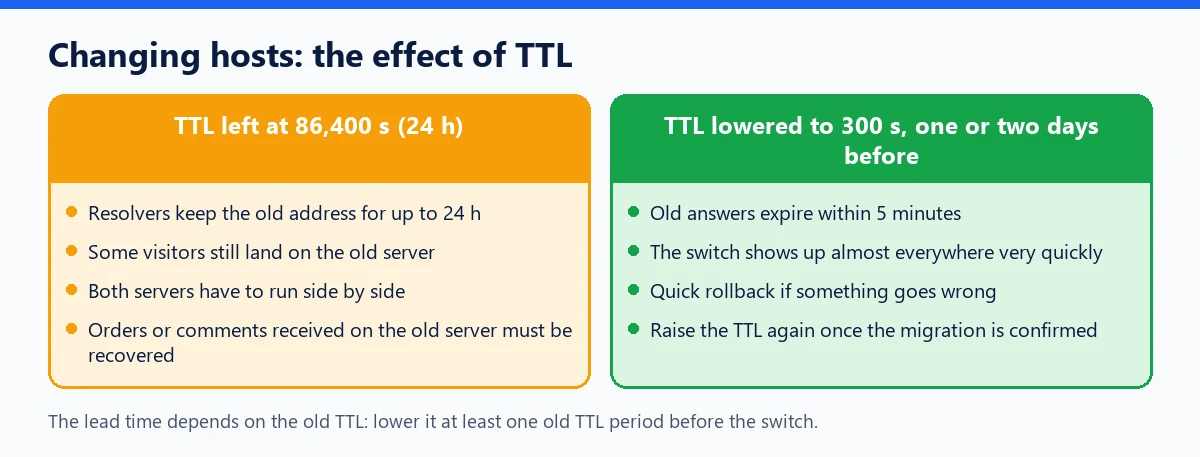
People commonly talk about propagation, as if the change spread from server to server. In reality, your authoritative server gives out the new value as soon as the change is saved. It's the thousands of resolvers around the world that keep the old answer until their copy expires. The maximum delay therefore depends on the old TTL, not the new one: a record set to 24 hours can keep being served unchanged for up to 24 hours after the change.
Which values to choose
- Stable records (MX, verification TXT records, addresses of hosting that doesn't move): a few hours to a day.
- Before a migration: 300 seconds, set at least one old TTL period before the switch, then raised again once everything checks out.
- Behind a CDN or a proxy: the provider often manages the TTL of the records it serves; with Cloudflare in proxy mode, its network answers, and changing the origin's address doesn't require waiting for resolvers. Our article on Cloudflare and WordPress covers this setup in detail, and the CDN definition explains the principle.
A very short TTL isn't free: each visitor triggers a full resolution more often, which adds a little latency and more traffic to your name servers.
For WordPress
- Prepare a migration in two stages: lower the TTL, then copy the site, switch the A and AAAA records, and check with a command-line DNS lookup tool (
digornslookup). - During the transition, avoid writing to the old site: orders, comments and sign-ups would be lost there. A working copy, such as a staging site, lets you test everything before switching.
- For a certificate issued through DNS validation, wait until the TXT record is visible before starting the check: Let's Encrypt notes that DNS server update delays may require it.