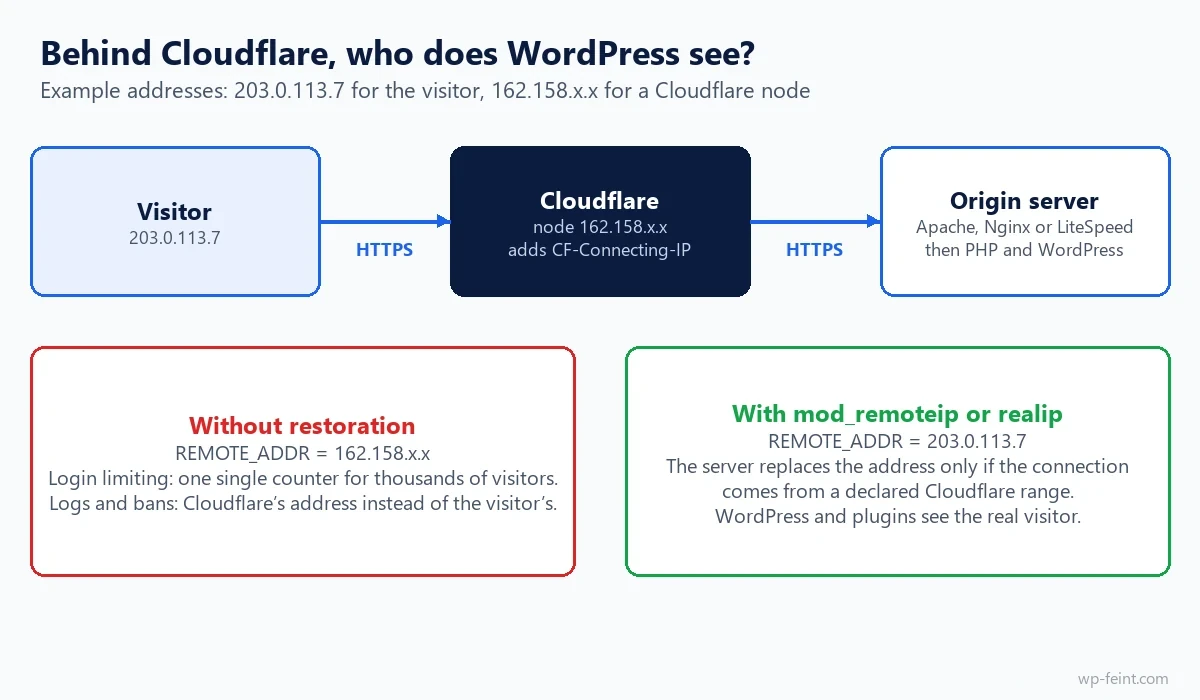
Putting Cloudflare in front of a WordPress site gives you caching, a firewall and protection against denial-of-service attacks. But WordPress no longer sees your visitors: it sees Cloudflare's servers. Handled badly, this detail disables login attempt limiting or lets an attacker pick their own IP address. Here is how to restore the real IP in the right place, protect the origin, and write a few useful firewall rules.
Why WordPress sees Cloudflare's address
Cloudflare works as a reverse proxy: the visitor connects to Cloudflare, then Cloudflare opens its own connection to your server. For PHP, the $_SERVER['REMOTE_ADDR'] variable therefore holds the address of the Cloudflare node. As long as nothing is fixed:
- login attempt limiting counts the failures of thousands of visitors against a handful of Cloudflare addresses, and ends up either blocking innocent people or blocking nothing at all;
- the logs of the server and of security plugins become useless during an incident;
- comment antispam tools and a store's anti-fraud checks lose their main clue.
The headers Cloudflare passes along
| Header | Content | Availability |
|---|---|---|
CF-Connecting-IP | A single address: that of the client connected to Cloudflare | All plans |
True-Client-IP | Same value, under the name used by other CDNs | Enterprise plan, via a managed transform |
X-Forwarded-For | A list: if the request already contained one, Cloudflare appends the address that connected | All plans |
CF-IPCountry | Two-letter country code (XX unknown, T1 Tor network) | Via the managed transform for visitor location headers |
CF-Ray | Request identifier, useful for support | All plans |
X-Forwarded-For is the most misleading: its first value may have been written by the client itself. A plugin that takes its first element will believe any made-up address.
The trap: a header can be forged in one line
An HTTP header is just text sent by the client. If your server also answers directly, without going through Cloudflare, an attacker can call it with CF-Connecting-IP set to whatever they like. The Apache documentation makes the point for mod_remoteip: it is trivial for a client to impersonate another, so you should only trust known intermediate proxies.
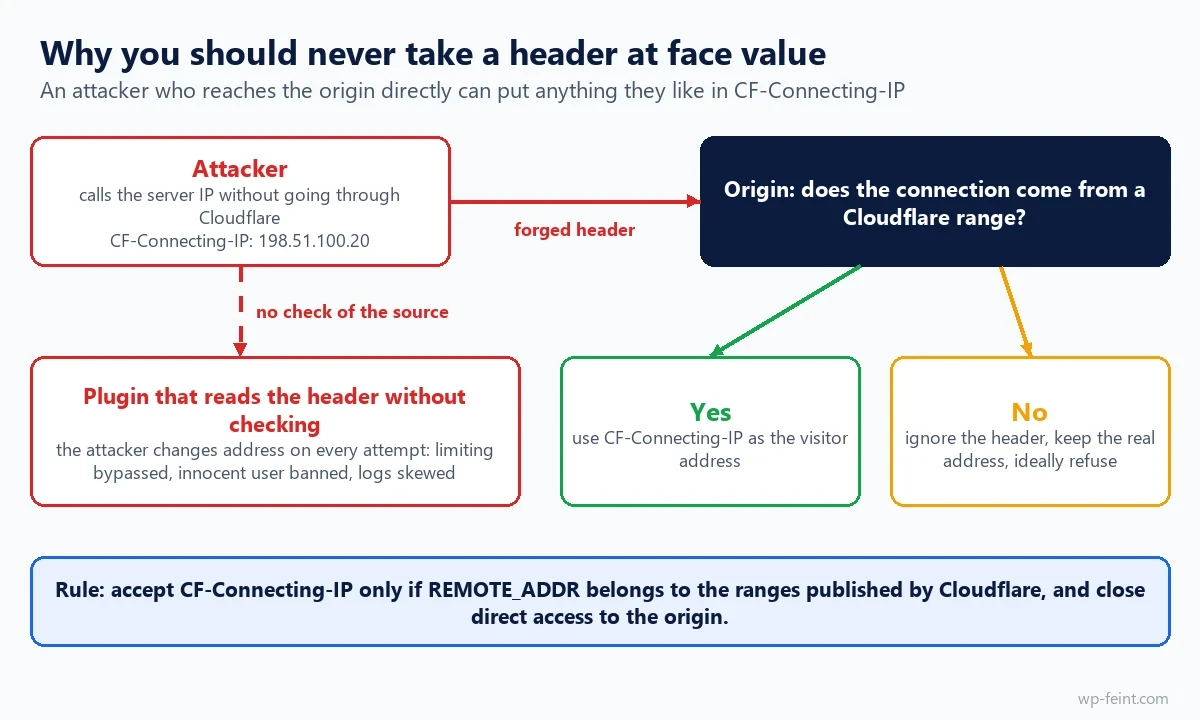
The consequences of blind trust are concrete: the attacker changes address on every password attempt and gets around the limiting, gets a legitimate customer's address banned, or muddies your logs.
Restoring the real IP at the server level
The right place is the web server, before PHP: WordPress and every plugin then receive the correct value in REMOTE_ADDR, with no per-plugin configuration. Cloudflare publishes its IP ranges as plain text at https://www.cloudflare.com/ips-v4/ and https://www.cloudflare.com/ips-v6/, and through its API at https://api.cloudflare.com/client/v4/ips. As of October 2026, the list contains 15 IPv4 ranges and 7 IPv6 ranges. It rarely changes, but it does change: automate the update rather than copying it once and for all.
Apache: mod_remoteip
Enable the module (a2enmod remoteip on Debian and Ubuntu), then declare each range. RemoteIPTrustedProxy restricts trust to the listed addresses: without a directive of this kind, the module trusts any host that sends the header.
RemoteIPHeader CF-Connecting-IP
RemoteIPTrustedProxy 173.245.48.0/20
RemoteIPTrustedProxy 103.21.244.0/22
# ... one line per IPv4 and IPv6 range published by Cloudflare
RemoteIPTrustedProxy 2400:cb00::/32

# Logs: %a (restored address) instead of %h
LogFormat "%a %l %u %t \"%r\" %>s %O \"%{Referer}i\" \"%{User-Agent}i\"" combined
Nginx: ngx_http_realip_module
The module is not compiled into Nginx by default (--with-http_realip_module option); check that it is present with nginx -V. set_real_ip_from defines the trusted addresses.
set_real_ip_from 173.245.48.0/20;
set_real_ip_from 103.21.244.0/22;
# ... one line per range published by Cloudflare
set_real_ip_from 2400:cb00::/32;
real_ip_header CF-Connecting-IP;
LiteSpeed and shared hosting
On LiteSpeed, Cloudflare states that the Use Client IP in Header option makes the client's address appear in REMOTE_ADDR. On shared hosting without access to the configuration, ask your host whether it already restores the address for Cloudflare. Be wary of PHP snippets that copy HTTP_CF_CONNECTING_IP into REMOTE_ADDR without checking the originating address: they create exactly the flaw described above.
To check: log in from a private browsing window, then compare the address recorded by the server or by your security plugin with your public address.
Closing direct access to the origin
Restoring the IP is not enough if the origin can still be reached directly: the attacker then bypasses Cloudflare's firewall. Cloudflare's documentation compares several methods:
| Method | Security level according to Cloudflare | Plans | Note |
|---|---|---|---|
Cloudflare Tunnel (cloudflared) | Most secure | All | The origin no longer has a public address to attack |
| Authenticated Origin Pulls | Very secure | All | Full or Full (strict) SSL mode required; a custom certificate is recommended |
| Allowlisting Cloudflare IPs | Moderate | All | Ranges must be kept up to date; combine with another measure |
| Secret header checked by the origin | Moderate | All | Vulnerable to replay if the secret leaks |
Think about history too: if your server's address was public before Cloudflare, DNS history services have kept it. Cloudflare advises proxying all relevant DNS records and, if possible, changing the origin's address.
Useful firewall rules for WordPress
Cloudflare's firewall does not offer the same tools on every plan. Before writing rules, check what you have available:
| Feature | Free | Pro | Business | Enterprise |
|---|---|---|---|---|
| Custom rules | 5 | 20 | 100 | 1,000 |
| Regular expressions | No | No | Yes | Yes |
| Free managed ruleset | Yes | Yes | Yes | Yes |
| Cloudflare Managed Ruleset and OWASP Core Ruleset | No | Yes | Yes | Yes |
| Rate limiting rules | 1 (per IP, 10 s period) | Depends on plan | Depends on plan | Depends on plan |
With five free rules, prioritize those that target the most common attacks on WordPress. Example expressions to enter in the rule editor:
# 1. Block XML-RPC if you don't use it (Jetpack and some apps need it)
(http.request.uri.path eq "/xmlrpc.php")

# 2. Managed challenge on login for countries where you have no users
(http.request.uri.path eq "/wp-login.php" and ip.src.country ne "FR")

# 3. Block PHP execution in media uploads
(http.request.uri.path contains "/wp-content/uploads/" and http.request.uri.path contains ".php")- Use the Managed Challenge action rather than blocking on the login page: a human gets through, a script usually fails.
- Do not challenge all of
/wp-admin/:admin-ajax.phpis also used by visitors (forms, carts, filters). - The
ip.src.countryfield replacesip.geoip.country, which is deprecated. - A country rule gets in the way of administrators who travel: plan an exception by address or access through a VPN.
Common mistakes
| Mistake | Symptom | Fix |
|---|---|---|
| "Flexible" SSL/TLS mode with an HTTPS redirect on the origin | Infinite redirect loop | Switch to Full or Full (strict), which Cloudflare recommends |
Reading the first value of X-Forwarded-For | Made-up addresses in the logs | Read CF-Connecting-IP, restored by the server |
| Forgotten IPv6 ranges | Some visitors keep a Cloudflare address | Declare both IPv4 and IPv6 ranges |
| Origin reachable directly | Firewall bypassed, headers forgeable | Tunnel, Authenticated Origin Pulls or allowlist |
| "Cache everything" rule with no exceptions | Login or account pages served to other visitors | Exclude /wp-admin/, wp-login.php, cart, account and logged-in visitors |
By default, Cloudflare caches neither HTML nor responses that contain a Set-Cookie header. The risk comes from rules that force pages to be cached: that is where you need to plan exclusions.
WP Feint behind Cloudflare
WP Feint Pro deliberately ignores the X-Forwarded-For header received from the client, to prevent the spoofing described above. Its Cloudflare support reads CF-Connecting-IP only when the request comes from an official Cloudflare IP range, updated weekly; login limiting, bans and logs then see the visitor's real address. If your server already restores the address (mod_remoteip, Nginx real_ip), even better, and this option can stay off. The counters use an HMAC fingerprint of the address, never the address in clear text. Host-specific settings are detailed on the host and cache compatibility page.
Key takeaways
- Behind Cloudflare,
REMOTE_ADDRholds Cloudflare's address until the server restores the real one. - Restore it at the server level (mod_remoteip, realip, LiteSpeed option) using
CF-Connecting-IPand only the ranges published by Cloudflare, IPv6 included. - Never trust an address header without checking where the connection comes from.
- Close direct access to the origin: Tunnel, Authenticated Origin Pulls or allowlist.
- On the free plan, five custom rules are enough for XML-RPC, the login page and PHP in media uploads.
- Avoid Flexible SSL mode and cache rules without exclusions.
Sources
- Cloudflare: Cloudflare HTTP headers (opens in a new tab)
- Cloudflare: Restoring original visitor IPs (opens in a new tab)
- Apache HTTP Server: mod_remoteip (opens in a new tab)
- Nginx: ngx_http_realip_module (opens in a new tab)
Other sources consulted: official documentation and official vendor pages.