

bcrypt was introduced in 1999 by Niels Provos and David Mazières, of the OpenBSD project, in a paper titled “A Future-Adaptable Password Scheme.” Its core idea is right there in the title: a password hashing function must be able to get slower as computers get faster. Where a fast function like SHA-256 lets an attacker test billions of candidates, bcrypt makes every guess expensive, for the attacker as well as for the server.
How bcrypt works
bcrypt is based on a variant of the Blowfish cipher whose key setup is deliberately expensive. Three elements go into the computation:
- the password, of which only the first 72 bytes are taken into account;
- a random salt, generated for each password;
- a cost factor: each additional unit doubles the computation time.
The result bundles everything needed to verify the password later: the algorithm identifier ($2y$ in PHP), the cost, the salt and the hash. The password_verify() function reads these parameters back and repeats the computation, with no need to store the salt separately.
$hash = password_hash( $password, PASSWORD_BCRYPT ); // cost 12 by default since PHP 8.4
password_verify( $input, $hash ); // true or false
bcrypt compared with other algorithms
The OWASP Password Storage Cheat Sheet ranks Argon2id as the first choice, scrypt next, and reserves bcrypt for legacy systems, with a cost factor of at least 10 and particular attention to the 72-byte limit. bcrypt is still very widespread, though, because it is available everywhere: it is the only algorithm PHP guarantees on every installation. In any case, it offers far better protection than a fast function like MD5 or SHA-1 used on its own, which can be computed at an enormous rate on a graphics card.
For WordPress
For years, WordPress used the phpass library, based on MD5 with many iterations. WordPress 6.8, released on April 15, 2025, switched to bcrypt for user passwords. The details, published on the core developers' blog:
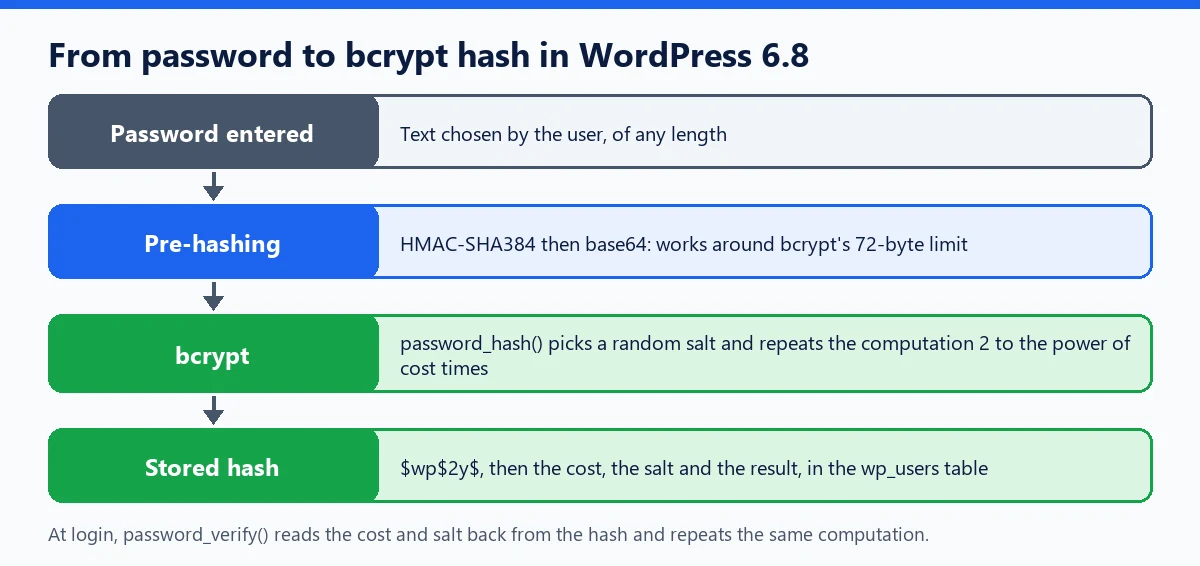
- The password is first pre-hashed with HMAC-SHA384 and then base64-encoded, so that passwords longer than 72 bytes keep all their entropy.
- Hashes carry the
$wp$2y$prefix, which sets them apart from standard bcrypt. - Old phpass hashes are still accepted and are converted to bcrypt the next time each user logs in or changes their password.
- Application passwords, password reset keys and a few other tokens use a different function, BLAKE2b through the Sodium library; existing application passwords are not converted automatically.
- The
wp_hash_password_algorithmfilter lets you choose Argon2id if the server supports it, andwp_hash_password_optionslets you adjust parameters such as the cost.
No action is needed on your side. Just keep in mind that rolling back to WordPress 6.7 or earlier would prevent users who have already been converted from logging in until they reset their password. Our article on wp-config.php covers this change and the file's security keys.
What bcrypt doesn't do
bcrypt protects passwords after a database leak: it slows down offline cracking. It does nothing against an online brute-force attack on the login page, nor against a password that already appeared in a breach and is reused elsewhere, the basis of credential stuffing. For that, rely on unique passwords, login attempt limits and two-factor authentication, which WP Feint Pro offers along with its login attempt limiting.