
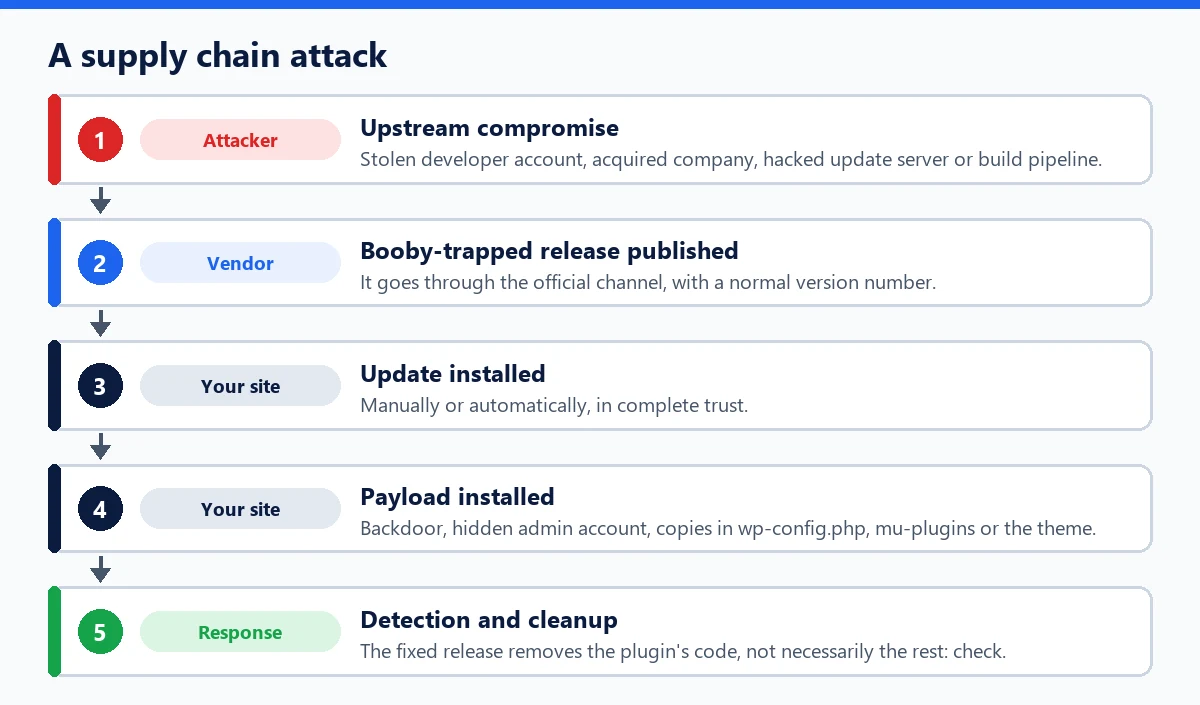
The idea is not to attack victims one by one, but to booby-trap something they all install. MITRE classifies this technique as “Supply Chain Compromise”: the attacker manipulates a product or its delivery mechanism before it reaches the end user. For a WordPress site, this means that a perfectly normal update, from the right vendor and through the right channel, can install a backdoor.
The possible entry points
OWASP made it a category of its own in its 2025 Top 10 (“Software Supply Chain Failures”), covering failures in how software is built, distributed or updated. In the WordPress ecosystem, there are four scenarios:
- the developer's account is stolen, often with a password already leaked elsewhere;
- the plugin is bought, which gives the new owner a legitimate right to publish;
- the update server of a premium vendor is hacked;
- the build pipeline (code repository, continuous integration) is compromised upstream.
Real-world examples
Outside WordPress, OWASP cites the SolarWinds compromise in 2019, which reached about 18,000 organizations through a software update. In WordPress, four documented attacks between 2024 and 2026 each illustrate one of the entry points: five wordpress.org plugins booby-trapped in June 2024 through developer accounts, a portfolio of 31 plugins bought and then booby-trapped, a Smart Slider 3 Pro release distributed from the vendor's own server, and ShapedPlugin Pro plugins compromised in their build pipeline. More recently, Rank Math PRO 3.0.123 was distributed booby-trapped for a few hours, and UpdraftCentral keys stolen from TeamUpdraft were used to install malicious plugins.
How to reduce the risk
You can't review every line of code in an update yourself. You can, however, limit your exposure and quickly spot the signs of a compromise:
- Fewer dependencies: every plugin is one more supplier. Delete the ones you no longer use.
- Watch for ownership changes: an acquisition isn't suspicious in itself, but it warrants reading the next releases carefully.
- Stagger premium updates on important sites by running them through a staging site first, without delaying urgent security fixes.
- Protect your own developer or agency accounts with two-factor authentication: WordPress.org made it mandatory for plugin and theme authors starting in October 2024.
- Watch what changes outside the plugin: new administrators, wp-config.php, the mu-plugins folder, theme files.
For WordPress: what WP Feint can do
WP Feint doesn't analyze plugin code and doesn't detect malware hidden in an update. It helps you spot the effects: the WP Feint Pro activity log records account creation and plugin installs and updates, which lets you date a compromise and find an added administrator. Its integrity check only covers WordPress core files, not plugin files: if a plugin you use is reported as booby-trapped, follow the cleanup procedure published by the vendor or the researchers, and restore a clean backup if any doubt remains.