All-in-One WP Migration packs an entire site into a single file to move or restore it, which makes it a prime target: whoever controls the export or the import controls the site. WPScan attributes 13 vulnerabilities published between January 2020 and September 20, 2026 to it, five of them in 2026 alone, and its paid cloud storage extensions had their own vulnerability in 2023. Here is what each one allowed, how the vendor responded and what to check on your sites.
All-in-One WP Migration in brief
All-in-One WP Migration and Backup is published by ServMask, a company specializing in WordPress migration tools. Released on wordpress.org in January 2014 under the slug all-in-one-wp-migration, the plugin has more than 5 million active installations (wordpress.org). It exports the database, media, plugins and themes into an archive in the .wpress format, which you then import on the new server. ServMask separately sells official extensions: Unlimited (no import size limit), Google Drive, Dropbox, OneDrive, Box and other storage destinations. These are separate plugins: a vulnerability in one of them does not affect a site that only uses the free version, and vice versa.
A migration plugin handles the most sensitive things a site has. The archive contains the users table with their hashed passwords, customer data and private content; the import, for its part, replaces the database and files with those from the archive. Leaving an archive in a public folder amounts to publishing your database, as we explained about exposed sensitive files, and a hijacked import amounts to installing the attacker's code. Our UpdraftPlus vulnerability timeline shows the same stakes on the backup plugin side.
Timeline of All-in-One WP Migration vulnerabilities from 2020 to September 2026
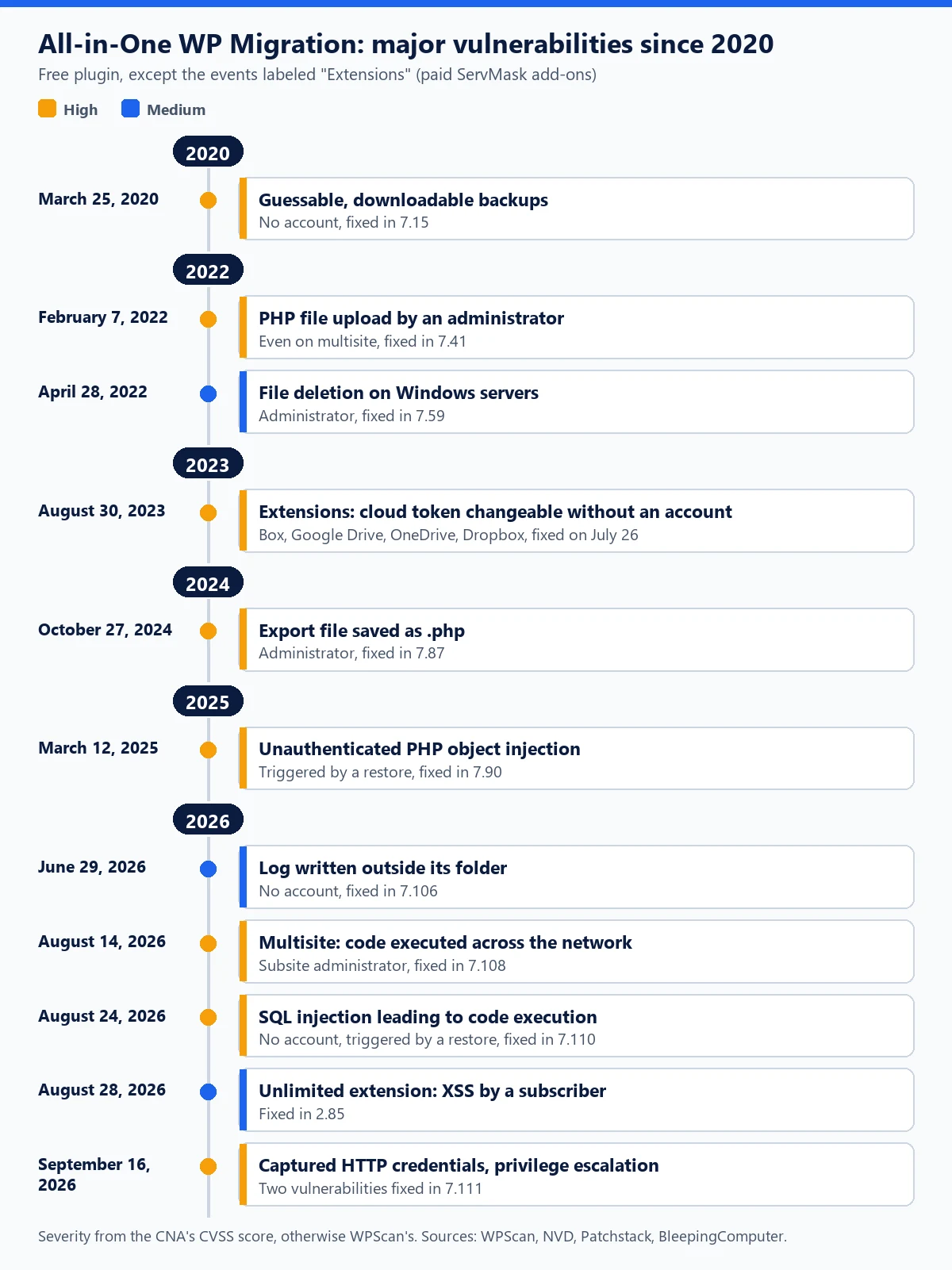
Since the list is short, the table includes every vulnerability in the free plugin published by WPScan since 2020. The date is the WPScan publication date; the CVSS score is the one from the authority that assigned the CVE (CNA), otherwise WPScan's. None of these vulnerabilities is documented as exploited by a recognized source as of this writing.
| Published | Fixed in | Type | CVSS | CVE | Account required |
|---|---|---|---|---|---|
| March 25, 2020 | 7.15 | Guessable, downloadable backups | 7.5 (WPScan), 5.9 (Wordfence) | None | None |
| February 7, 2022 | 7.41 | PHP file upload, including on multisite | 7.2 (NVD) | CVE-2021-24216 | Administrator |
| April 28, 2022 | 7.59 | File deletion via directory traversal (Windows servers) | 6.6 | CVE-2022-1476 | Administrator or holder of the secret key |
| August 23, 2022 | 7.63 | Reflected XSS (export action) | 4.7 | CVE-2022-2546 | None (secret key needed, the victim must click) |
| October 21, 2024 | 7.87 | Publicly accessible log files | 5.3 | CVE-2024-8852 | None |
| October 27, 2024 | 7.87 | Export file saved as .php, code injection | 7.2 | CVE-2024-9162 | Administrator |
| March 12, 2025 | 7.90 | PHP object injection | 7.5 | CVE-2024-10942 | None (an administrator must export then restore) |
| August 26, 2025 | 7.98 | Stored XSS via import (multisite or unfiltered_html disabled) | 4.4 | CVE-2025-8490 | Administrator |
| June 29, 2026 | 7.106 | Creating or appending to a log file at any location | 6.5 | CVE-2026-12898 | None |
| August 14, 2026 | 7.108 | Multisite: super-admin-only import not checked, PHP code across the network | 7.2 | CVE-2026-17533 | Subsite administrator |
| August 24, 2026 | 7.110 | Second-order SQL injection during a restore, code execution | 8.8 | CVE-2026-19949 | None to inject it (an administrator must restore) |
| September 16, 2026 | 7.111 | Capture of HTTP (Basic) credentials and application passwords | 5.3 | CVE-2026-89064 | None |
| September 16, 2026 | 7.111 | Privilege escalation via the import secret key | 7.2 | CVE-2026-81810 | Role granted the export capability (non-standard setting) |
Two remarks about this table. The secret key mentioned several times (ai1wm_secret_key) is a site-specific value that authorizes export and import operations: knowing it means being able to start an import. And several fixes came out before publication, sometimes by several months: 7.41, which fixes the PHP file upload, dates from April 2021, ten months before the WPScan entry.
The notable vulnerabilities explained
2020: backup names that were too easy to guess
Up to version 7.14, archives were stored in wp-content/ai1wm-backups/ and named following the pattern domain, date, time, then a random number from 100 to 999. The folder prevented its contents from being listed, but a file whose name you knew could be downloaded directly. Researcher Kamil Vavra showed that by reading the last-modified date of a publicly served configuration file (web.config), you could estimate when the plugin had been installed; assuming a backup made within the next ten minutes, it took about 600,000 requests to hit the right archive, without any account.
He reported the vulnerability on January 13, 2020, the vendor replied the same day and released 7.15 on January 20; later versions made the names more random. An important point raised by the researcher: the archives remained in this folder even after the plugin was uninstalled. Patchstack classifies the vulnerability as low priority, WPScan rates it 7.5.
August 2023: the cloud storage extensions
This vulnerability concerns four paid ServMask extensions, not the free plugin: Box (up to 1.53), Google Drive (up to 2.79), OneDrive (up to 1.66) and Dropbox (up to 3.75). Their init function, hooked to the WordPress admin_init hook, saved the storage service access token received in the URL, without checking either the user's capabilities or a security token (nonce). Yet admin_init also runs for an anonymous visitor calling admin-ajax.php. An unauthenticated attacker could therefore replace or delete the token, and thus send exports to their own cloud account or get a booby-trapped archive restored (CVE-2023-40004, rated 7.3 by Patchstack).
Rafie Muhammad of Patchstack discovered the vulnerability on July 18, 2023; ServMask fixed the four extensions on July 26 (Box 1.54, Google Drive 2.80, OneDrive 1.67, Dropbox 3.76) and the advisory was published on August 30. BleepingComputer pointed out that these extensions should only be active for the duration of a migration, which reduced the risk. Another extension, Unlimited, had a stored XSS in 2026 exploitable by a mere subscriber, due to a missing authorization check on its settings (CVE-2026-6128, rated 6.4 by Wordfence, published on August 28, 2026); the ServMask changelog shows the fix in 2.85, released in June 2026.
2024 and 2025: .php export and object injection
In October 2024, researcher Ryan Kozak showed that an administrator could save an export with the .php extension and slip code into it (CVE-2024-9162). The vulnerability requires an administrator account, but it matters on sites where you specifically want to prevent an administrator from running code, for example a multisite network or an installation where file editing is disabled. The same version 7.87 closed public access to the log files, which revealed full server paths (CVE-2024-8852).
In March 2025, Wordfence published a PHP object injection in the replace_serialized_values function, which replaces the site's old URL with the new one in serialized data (CVE-2024-10942, 7.5). The attacker did not need an account, but an administrator had to export and then restore the site, and another plugin or a theme had to provide an exploitable "POP chain". The mechanism is explained in our article on PHP deserialization and object injection.
August 2026: the SQL injection that waits for a restore
The most serious vulnerability in the plugin's history is a so-called second-order SQL injection (CVE-2026-19949, rated 8.8 by Wordfence). When restoring an archive, the plugin rewrites the database content and mishandled certain escaped backslashes and quotes. An unauthenticated attacker could drop a payload into the database, for example through a trackback; it lay dormant until an administrator exported and then imported the site. At that point, the injected query could reveal the import secret key, with which the attacker imported a .wpress archive containing executable code, and thus took over the site.
Jack Taylor reported the vulnerability in mid-August through the Wordfence program, which alerted ServMask on August 15; 7.110 fixed it on August 20, 2026, and the changelog thanks the researcher. According to BleepingComputer, on September 2, only about 35% of sites had updated, leaving some 3.25 million installations still vulnerable. A deactivated plugin reduces the risk, but it comes back as soon as you reactivate it for a migration.
September 2026: captured credentials and a hijacked import
7.111 of September 15, 2026 fixed two vulnerabilities published on the 16th. The first (CVE-2026-89064, reported by Jakub Herman) lies in the plugin's initialization function, run without any check for every request to admin-ajax.php or admin-post.php: it saved in the database, merely base64-encoded, the HTTP authentication credentials it received, without checking who sent them. An attacker could thus get their own values saved, or get the application password that a legitimate integration presents to /wp-admin/ captured. The second (CVE-2026-81810, reported by Charles Vosburgh) concerned sites where an administrator has granted the export capability to another role: the plugin revealed the secret key to that role, which could then import an archive and become administrator. Since 7.111, export and import require the administrator capability.
What this history shows
- Import is the weak spot: PHP file upload (2022), .php export (2024), object injection (2025), multisite, SQL injection and privilege escalation (2026) all go through export, import or restore.
- A key that opens everything: several vulnerabilities target the import secret key, because it is enough to get an archive accepted. Protecting it means protecting the site.
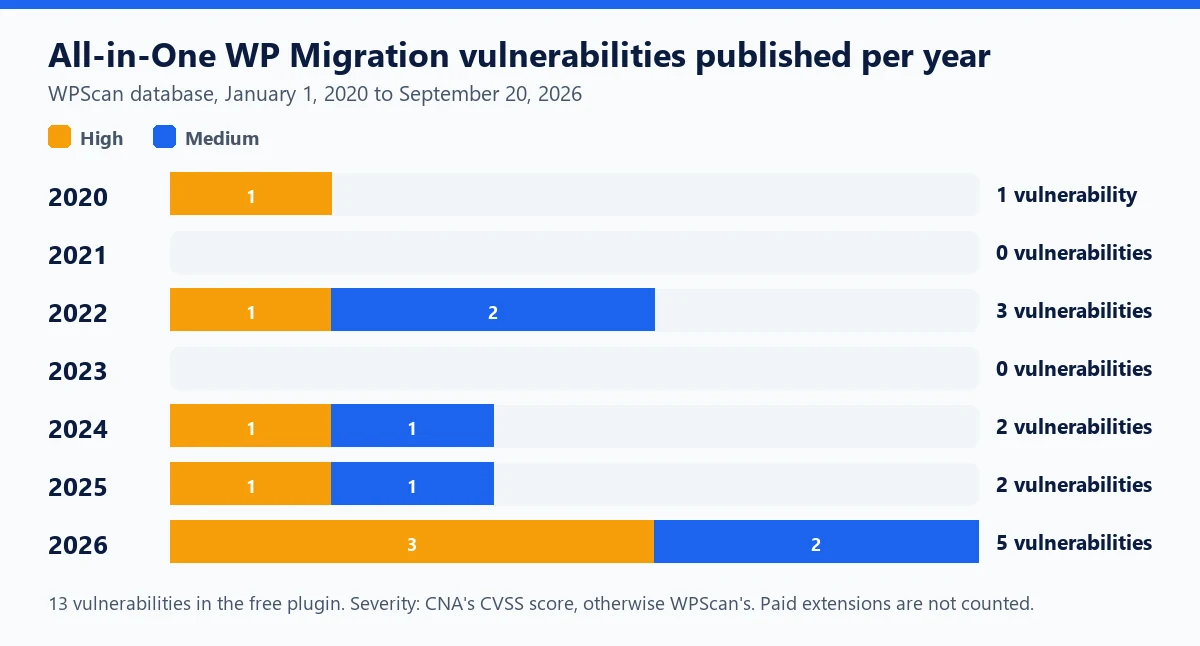
- The pace is accelerating: five vulnerabilities published in 2026, versus eight over the previous six years, three of them requiring no account for the attacker.
- Fast fixes, slow updates: ServMask fixed the SQL injection five days after being alerted, but nearly two weeks later, about two thirds of sites were still vulnerable.
WordPress core is not spared regular fixes either, as our timeline of WordPress security releases shows.
Protecting your site
- Update All-in-One WP Migration to at least 7.111, ideally the latest version, along with its paid extensions (Unlimited at least 2.85). Paid extensions update separately: check them too.
- Deactivate the plugin between migrations, and delete it if you no longer migrate: as BleepingComputer pointed out in 2023, a migration tool does not need to stay active permanently (see abandoned plugins). Remember to update it before reactivating it.
- Do not leave archives on the server: delete the
.wpressfiles fromwp-content/ai1wm-backups/once the migration is done, including after uninstalling, and keep your backups off the site following the 3-2-1 rule. - Only import trusted archives that you produced yourself, and never restore an archive with a vulnerable version.
- Turn on automatic updates (our guide to automatic plugin updates), add a web application firewall for the gap between a publication and your update, and watch the announcements that concern your plugins.
WP Feint Pro helps you not miss an announcement. Every day, it compares the installed versions with the public WPVulnerability.net database and sends a vulnerability alert by email with the severity and the fixed version; the member area shows pending updates and vulnerable sites, which also helps you spot a forgotten migration plugin. WP Feint alerts you: it does not fix All-in-One WP Migration and is not a firewall, so updating remains essential. For a firewall, see our comparison of the best WordPress security plugins.
Key takeaways
- WPScan lists 13 vulnerabilities in free All-in-One WP Migration from January 1, 2020 to September 20, 2026, 6 of them high and none critical, and 5 in 2026 alone.
- The most severe, CVE-2026-19949, allowed an unauthenticated SQL injection triggered by a restore, up to code execution; fixed in 7.110.
- The paid Box, Google Drive, OneDrive and Dropbox extensions had an unauthenticated storage token vulnerability in 2023 (CVE-2023-40004), and Unlimited an XSS in 2026.
- Minimum version: 7.111; deactivate the plugin between migrations and delete
.wpressarchives from the server.
Sources
- WordPress.org: All-in-One WP Migration and Backup, plugin page and active installations (external link, opens in a new tab)
- WordPress.org: All-in-One WP Migration, changelog (readme.txt) (external link, opens in a new tab)
- NVD: CVE-2023-40004, Box, Google Drive, OneDrive and Dropbox extensions (June 19, 2024) (external link, opens in a new tab)
- NVD: CVE-2026-19949 (August 25, 2026) (external link, opens in a new tab)
Other sources consulted: further CVE records, official vendor pages, security research publications, trade press articles, WPScan and Patchstack databases.
Update, October 28, 2026: on October 16, 2026, Wordfence reported requests targeting CVE-2026-19949 (fixed in 7.110) on 881 sites since September 10. These are probing attempts; no number of hacked sites has been published. If you are not on 7.110 or later yet, update. Full details: All-in-One WP Migration vulnerability probed: update to 7.110.