Open the access logs of any WordPress site that has been online for a few days: you will find requests for URLs you never created, such as /.env, /wp-config.php.bak or /phpmyadmin. These are not lost visitors, but bots looking for vulnerabilities and forgotten files. This article explains how to read these lines, how to tell background noise from a real alert, and how to respond usefully.
Reading a log line
An access log in the common format contains, for each request, the source IP address, the date, the method and the requested URL, the HTTP response code, the size returned and the user agent. The response code tells most of the story: it shows whether the requested file exists and was served, or not.
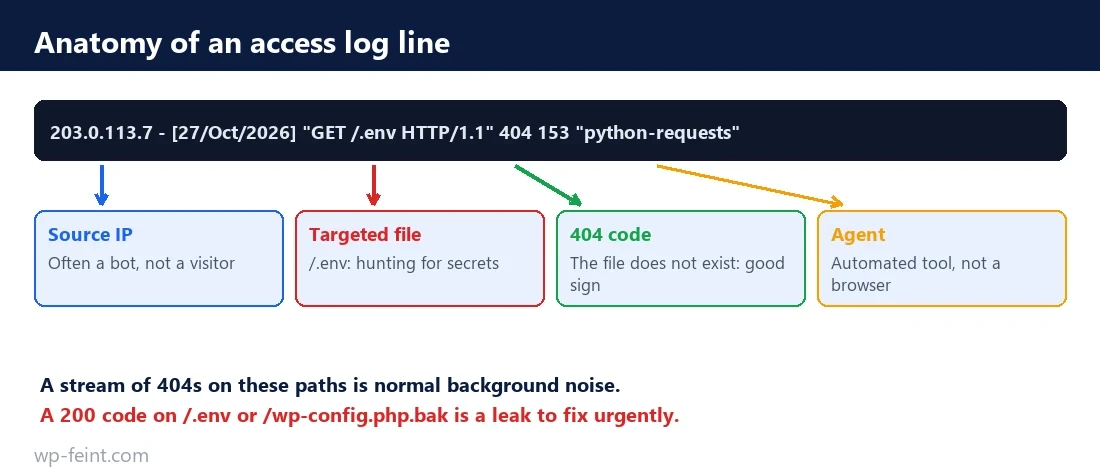
In the example above, a bot requests /.env and receives a 404 code. The declared agent is not a browser but an automated tool. This kind of line is routine and requires no action, as long as the code really is a 404 or a 403. On the other hand, a 200 code on one of these sensitive URLs means the file exists and was delivered: that is a leak to deal with urgently.
What scanner bots are looking for
Attack bots automate the search for a few dozen high-value targets. Knowing them helps you understand what you see going by.
| Requested URL | What the bot hopes for | Risk if the file exists |
|---|---|---|
| /.env | A framework's environment variables | API keys, database credentials |
| /wp-config.php.bak, /wp-config.php~ | A backup copy readable in plain text | Secrets and database access |
| /.git/config | An exposed code repository | Source code, history, sometimes secrets |
| /phpmyadmin, /adminer.php | A database management interface | Direct access to the data |
| .sql, .zip, .tar.gz backups | A full export of the site | The entire database |
| /xmlrpc.php, /wp-login.php | Authentication entry points | Brute force, amplification |
What these URLs have in common is that they never exist on a clean installation. A bot that requests them is simply running through its list, blindly, across thousands of sites. That is precisely what makes them a usable signal: a request for /.env does not come from a human.
Background noise or real alert?
Most of these requests are constant background noise. Treating all of them as targeted attacks leads to burnout and bad decisions. Here is how to sort them.
- Series of 404s on nonexistent paths: normal noise. Keep an eye on it without overreacting.
- A 200 code on a sensitive path (
/.env, a backup,/.git/config): a real leak. Remove the file and change the secrets it contained. - A spike in requests to wp-login.php or xmlrpc.php from the same IP: a brute force attempt. Limit logins and watch the accounts.
- Requests targeting a specific plugin shortly after a vulnerability is published: opportunistic exploitation. Check that the plugin is up to date.
A useful habit is to look not at each line, but at volumes. How many 404s per hour? Are there suddenly 200s where you expected only 404s? A change in pattern is more significant than an isolated line.
Where to find these logs
- On shared hosting, look for the access and error logs in the control panel (cPanel, Plesk or a custom interface). They are often named
access_loganderror_log. - On a server you manage, they are usually in
/var/log/apache2/or/var/log/nginx/. - Behind a CDN or a web application firewall, part of the traffic is filtered upstream; check that layer's logs as well.
Remember to check which IP address appears in your logs. Behind a proxy or a CDN, the recorded IP may be the proxy's, not the real visitor's. In that case, a header passed on by the proxy carries the real address, provided it comes from a trusted source.
Responding without drowning
Faced with this constant flow, the goal is not to block every bot, but to remove the targets and automate the responses.
- Delete files that have no business being online: backups,
.sqlexports,.gitdirectories,.bakfiles. If they return a 404, the bots leave empty-handed. - Block access to hidden and sensitive files at the server level, so that they are never served, even by mistake.
- Automate banning of addresses that pile up suspicious requests, for example with a tool like fail2ban, which reads the logs and adds firewall rules.
- Limit login attempts so that brute force on wp-login.php becomes ineffective.
Turning noise into signal with bot traps
That is exactly the approach of WP Feint's bot traps. Rather than putting up with this traffic, the plugin counts it. A request for a page that does not exist on your site, but that attack bots look for, is recorded as a trap hit: sensitive file URLs (/.env, /phpmyadmin, backups), WordPress URLs you have closed (wp-login.php, xmlrpc.php, /?author=), or URLs of the imitated software. A page that really exists is never counted, and logged-in visitors are ignored.
The Pro version adds a detailed log (with truncated IP addresses, kept for thirty days at most), automatic banning after a configurable number of triggered traps, and fake login pages designed to keep bots busy. The administrator's address is never banned. This count does not replace reading your server logs, but it gives you an immediate view of the intensity and nature of the probing your site is subjected to. These counters do not filter comment spam, which is a job for a WordPress anti-spam plugin.
A massive and evolving phenomenon
This scanning is far from anecdotal, and it is getting more sophisticated. In 2026, the GreyNoise intelligence team documented scanner campaigns that posed as the crawlers of artificial intelligence providers, spoofing their user agent, to look for .env files and cloud access keys. Several hundred IP addresses were involved over a few weeks, and one detail gave them away: unlike the real crawlers, they never requested the robots.txt file.
The lesson is twofold. First, relying on the user agent alone to allow or block a visitor is fragile, since it is trivially spoofed. Second, the number one target stays the same from one campaign to the next: secrets left accessible. An exposed .env file, backup or .git directory is worth all these bots' efforts, which is why you should make them disappear before anything else.
What not to do
Faced with this flow, some reactions do more harm than good.
- Blocking entire countries on a hunch: bots change addresses easily, and you risk excluding real visitors or legitimate services.
- Trying to ban every IP manually: it is endless work. It is better to automate rules based on behavior.
- Ignoring an unexpected 200 code by filing it as noise: that is precisely the signal you must not miss.
- Masking error codes without fixing the cause: returning a nice page changes nothing if the sensitive file is still served some other way.
Key takeaways
- Requests for /.env, /phpmyadmin or backups are automated noise, not visitors.
- A 404 is normal; a 200 on these paths is a leak to fix right away.
- Delete sensitive files and automate banning of abusive IPs.
- Bot traps turn this traffic into a readable indicator of the pressure your site is under.
Sources
- OWASP, Forced browsing (opens in a new tab)
- WordPress Developer, Hardening WordPress (opens in a new tab)
Other sources consulted: security research publications and trade press articles.