

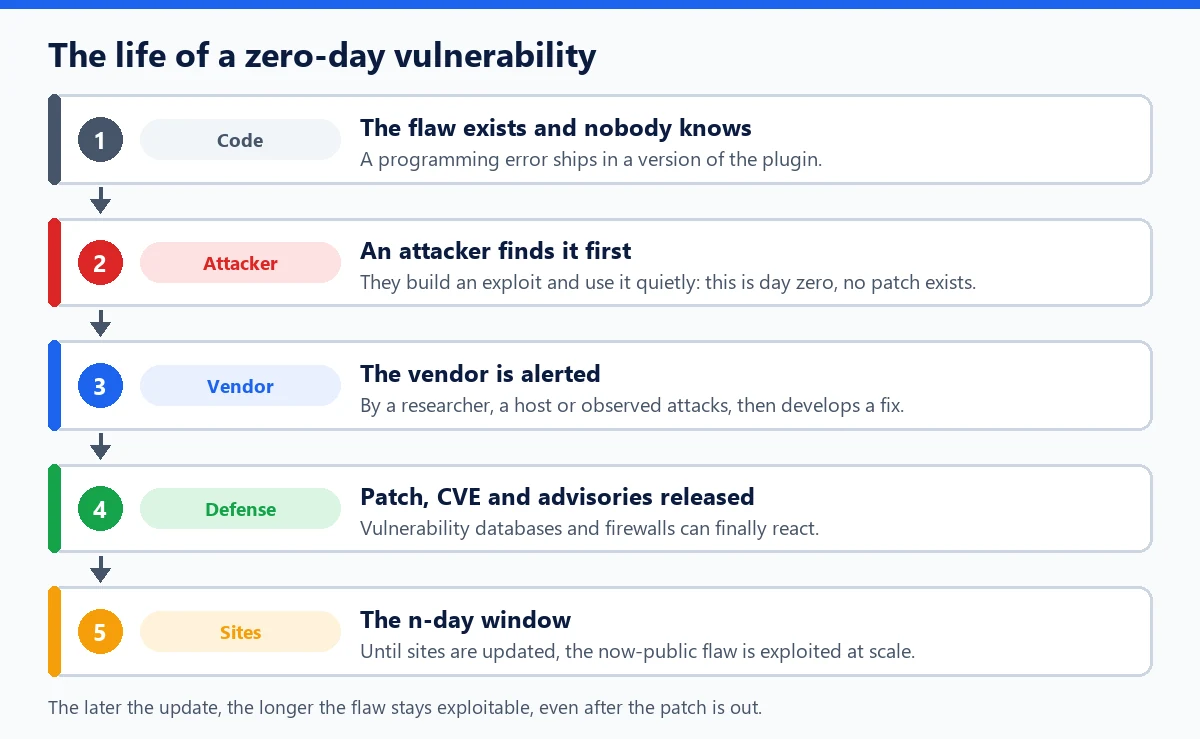
The term originally refers to the number of days defenders have had to prepare: none. When a zero-day vulnerability is exploited, the vendor hasn't released a patch yet, often because it doesn't know about the problem itself. Updating your site does nothing at that stage: there is no safe version to install yet.
Vulnerability, exploit, attack: three words to tell apart
People say “zero-day vulnerability,” “zero-day exploit” or “zero-day attack” interchangeably, yet they are three different things:
- the vulnerability is the error in the code (a forgotten access check, unfiltered data);
- the exploit is the program or request that takes advantage of that error;
- the attack is the use of that exploit against real sites. NIST defines it as an attack that exploits a previously unknown hardware or software vulnerability.
As soon as the patch is released, the flaw is no longer a zero-day in the strict sense. Specialists then call it an “n-day” vulnerability: it is known, documented and often assigned a CVE ID, but still present on every site that hasn't updated. This second period causes most mass hacks, because a public exploit is far easier to industrialize than a discovery kept secret.
An example from the WordPress ecosystem
In June 2023, the Ultimate Member registration plugin allowed any visitor to create an account with arbitrary capabilities, and therefore an administrator account. The CVE-2023-3460 record, published by WPScan, states that the vulnerability was actively exploited. The first fixed releases were incomplete, and it took until version 2.6.7 to close it: the timeline of this Ultimate Member vulnerability shows exactly what a zero-day looks like from a WordPress site.
To know whether a vulnerability is actually being exploited, not just theoretical, the US agency CISA maintains the KEV (Known Exploited Vulnerabilities) catalog. It only adds a vulnerability when three conditions are met: a CVE ID, reliable evidence of active exploitation and clear remediation guidance. In France, CERT-FR (France) publishes security alerts for immediate threats and security advisories for vulnerabilities and their fixes.
How to limit the damage without a patch
No measure guarantees immunity against a flaw nobody knows about yet. The goal is to reduce the likelihood of being hit and to shorten your reaction time:
- Less code, fewer flaws. Delete unused plugins and themes, even deactivated ones.
- Filter upstream. A web application firewall blocks some families of attacks by their shape, even without knowing the exact flaw; once it is disclosed, a virtual patch can neutralize it before the update.
- Limit privileges. Few administrator accounts, two-factor authentication and strict file permissions so that an intrusion stays contained.
- Detect quickly. Watch for new accounts and modified files: the WP Feint integrity check compares core files against wordpress.org checksums every day, which reveals a compromise after the fact without blocking the attack itself.
- Be able to roll back. Tested backups following the 3-2-1 rule remain the last safety net.
For WordPress: reacting the day the alert comes out
When an actively exploited vulnerability affects a plugin you use and no fixed version exists, the options are simple: deactivate or delete the plugin if the site can do without it, otherwise rely on a firewall rule and monitor closely. As soon as the patch is out, install it without waiting for your weekly update round. To be warned in time, you need a reliable source of alerts: our vulnerability monitoring method compares the available databases.
Common mistakes
- Calling every critical vulnerability a “zero-day”: a flaw patched six months ago is no longer one, it is simply unpatched on your site.
- Believing an up-to-date site is out of danger: updating is necessary, but a zero-day targets precisely the latest versions.
- Thinking a small site doesn't interest anyone: exploits are launched automatically against every site running the targeted plugin.