
In an SSRF attack, the attacker doesn't target the machine they are after directly: they use the website as a go-between. The web server often sits in a network where it can reach services nobody should be able to reach from the internet. If a feature of the site fetches a user-supplied URL without checking the destination, the attacker can make it query those services on their behalf. OWASP gave SSRF its own category in its 2021 Top 10 (A10), and MITRE lists it as CWE-918.
How an SSRF attack works
The features at risk are the ones that fetch a URL: importing an image from an address, generating a link preview, calling a webhook, checking a feed. The attacker slips in an internal address instead of a public one:
- the cloud metadata endpoint
169.254.169.254, used by AWS, Azure and Google Cloud, which can reveal credentials and access tokens; - the server itself (
localhost,127.0.0.1), for example an admin panel or a database that only listens locally; - the private network (
10.0.0.0/8,192.168.0.0/16…), to map machines and open ports; - protocols other than HTTP, such as
file://orgopher://, when the library in use accepts them.
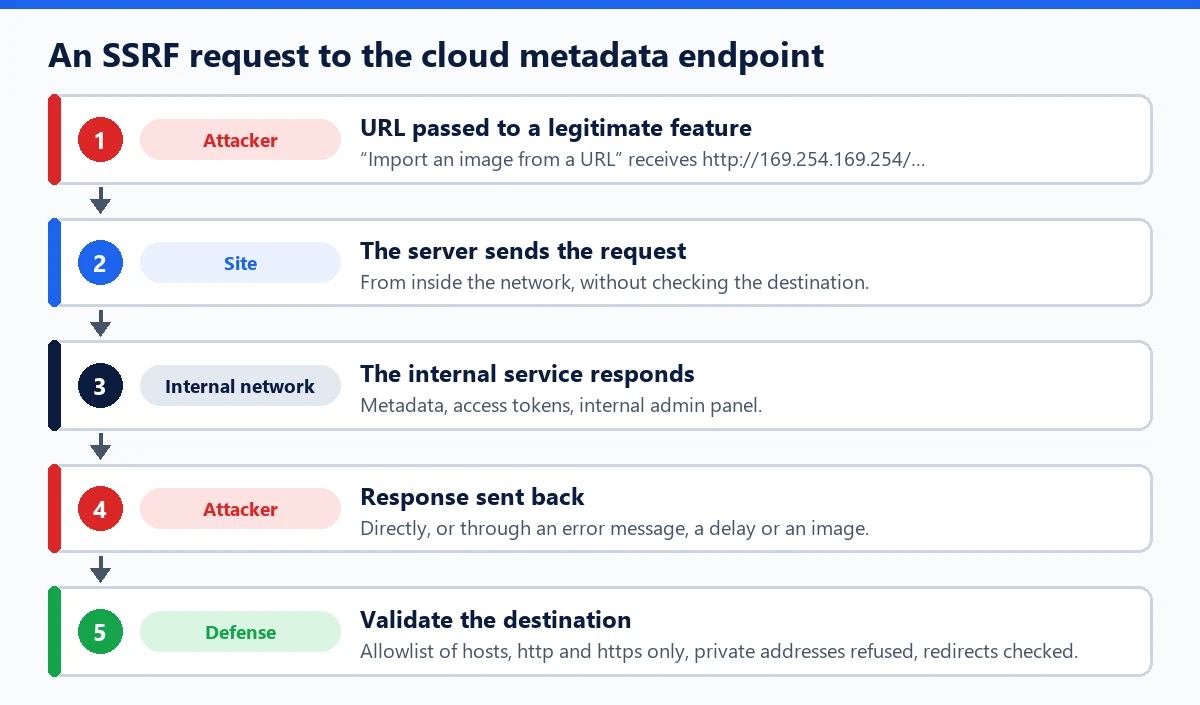
The response doesn't always come back in full: this is called “blind” SSRF when the attacker only sees an error message or a response time, which is still enough to tell whether a port is open.
How to protect against it
- Allowlist: when the destinations are known (a specific API), accept only those.
- http and https only, on standard ports.
- Refuse internal addresses after DNS resolution, and check every redirect too: a public domain name can point to a private address.
- On the hosting side: network segmentation and, on AWS, switching to IMDSv2, which OWASP recommends to limit metadata theft.
For WordPress: wp_safe_remote_get and pingbacks
WordPress provides the right tools, as long as you use them. wp_safe_remote_get() and its variants validate the URL and every redirect URL with wp_http_validate_url(): only http and https are allowed, credentials in the URL are refused, loopback and private addresses are rejected, and an explicit port must be 80, 443 or 8080. By contrast, wp_remote_get() doesn't perform this validation by default: a plugin that uses it with a visitor-supplied URL is exposed. The http_request_host_is_external filter lets you allow one specific internal host; opening it to everything defeats the protection.
$response = wp_safe_remote_get( esc_url_raw( $supplied_url ), array( 'timeout' => 5 ) );
if ( is_wp_error( $response ) ) {
    return; // URL refused or unreachable
}
Core itself once had this problem: before WordPress 3.5.1, the XML-RPC pingback could be used to send requests to internal servers and scan ports (CVE-2013-0235). Pingbacks now use wp_safe_remote_get(), but they remain a feature that makes your server send requests at a third party's request. If you don't use them, the WP Feint Hardening module blocks pingbacks and XML-RPC for free; our article on XML-RPC helps you check that no service depends on it. For the rest, SSRF has to be fixed in the code of the affected plugin, and a web application firewall can filter the most obvious internal addresses in the meantime.