Contact Form 7 runs on more than 10 million WordPress sites, and yet its security history fits in a few lines: five vulnerabilities published between 2020 and May 2026, only one of them critical. This article goes through them one by one, explains how they worked without giving an attack recipe, shows how the plugin handles uploaded files and what this low number means, or does not mean, for your site.
Contact Form 7 in brief
Contact Form 7 is one of the oldest form plugins for WordPress: it has been published on wordpress.org since August 2007. It is developed by Takayuki Miyoshi, whose company Rock Lobster Inc. is listed as the author in the official directory. It is free, with no paid version, and claims more than 10 million active installations (wordpress.org), the highest tier the directory displays.
This success makes it a logical target. A contact form is, by definition, a door open to anonymous visitors: it receives text, sometimes files, and triggers emails. A vulnerability in this code can therefore often be reached without an account. And with several million sites sharing the same code, an attacker who finds a weakness immediately has a huge field for automated scanning.
The plugin has also grown over the years: file attachments, reCAPTCHA, Akismet and Constant Contact integrations, then a Stripe payment module. Every feature added widens the exposed surface, and that is precisely where several of the recent vulnerabilities lie.
Timeline of vulnerabilities since 2020
The WPScan and Patchstack databases each list five vulnerabilities published for Contact Form 7 between January 1st, 2020 and May 30, 2026. All are fixed. For context, the same databases list three older entries: a file upload leading to code execution in versions up to 3.5.2, a CAPTCHA bypass fixed in 3.7.2 in February 2014 (CVE-2014-2265), and a privilege escalation fixed in 5.0.4 in September 2018 (CVE-2018-20979, rated 9.8 by the NVD), caused by an incomplete declaration of the capabilities of the post type that stores the forms.
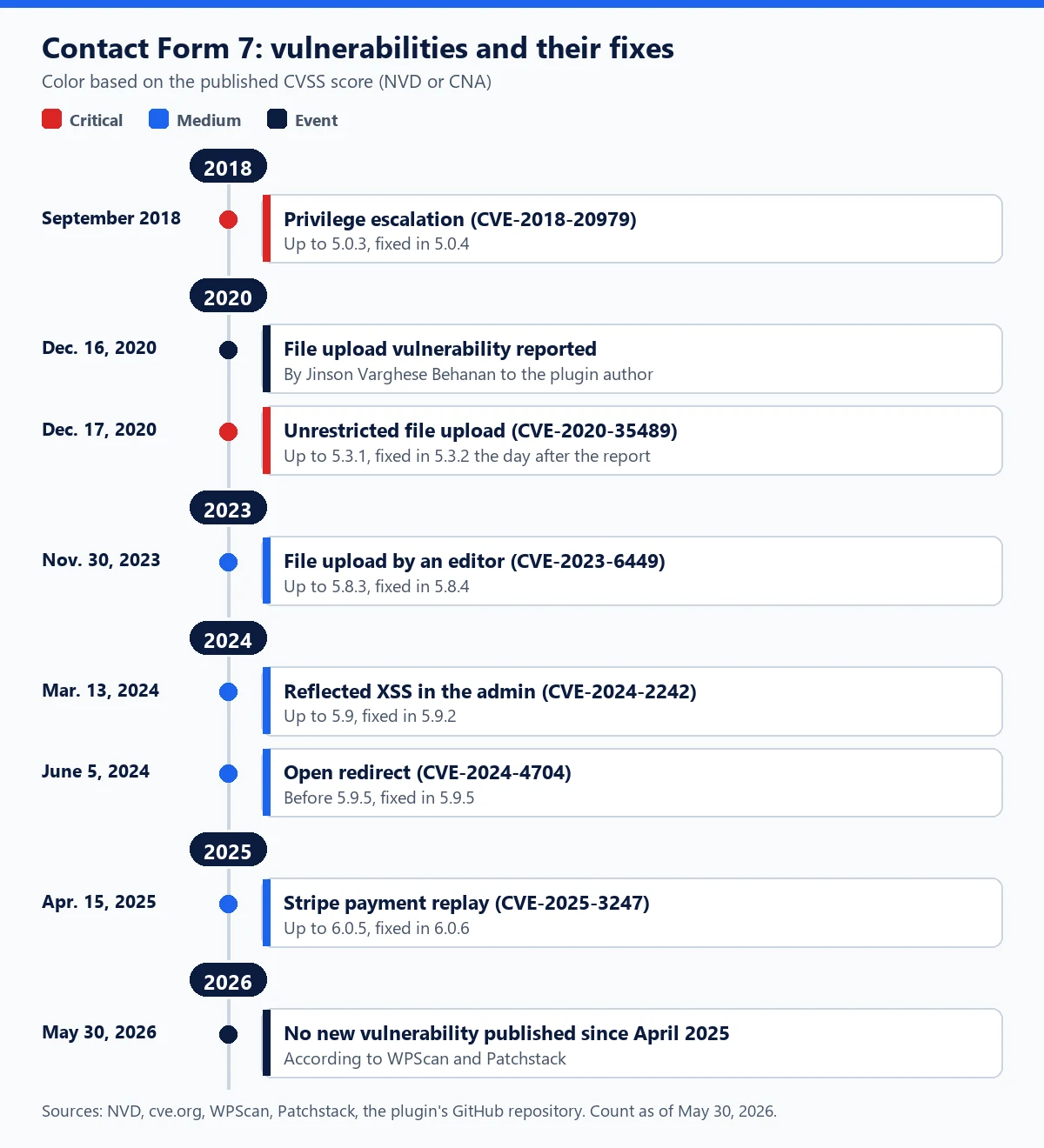
| Published | Fixed in | Type | CVSS | CVE | Account required |
|---|---|---|---|---|---|
| December 17, 2020 | 5.3.2 | Unrestricted file upload | 10.0 (NVD) | CVE-2020-35489 | None |
| November 30, 2023 | 5.8.4 | Arbitrary file upload | 6.6 (Wordfence), 7.2 (NVD) | CVE-2023-6449 | Editor |
| March 13, 2024 | 5.9.2 | Reflected XSS | 6.1 (Wordfence) | CVE-2024-2242 | None (a victim must click) |
| June 5, 2024 | 5.9.5 | Open redirect | 4.3 (WPScan), 6.1 (NVD) | CVE-2024-4704 | None (a victim must click) |
| April 15, 2025 | 6.0.6 | Stripe payment replay | 5.3 (Wordfence) | CVE-2025-3247 | None |
The dates are those of the advisory's publication. When two scores exist, the first is from the organization that assigned the CVE (Wordfence or WPScan), the second from the NVD. None of the sources consulted documents attacks exploiting these vulnerabilities.
The notable vulnerabilities explained
December 2020: an invisible character in a file name (CVE-2020-35489)
Contact Form 7 offers a file upload field. To prevent a visitor from uploading an executable script, the plugin runs every file name through a neutralization function: it splits the name on the dots and, if one of the parts looks like a script extension (php, phtml, pl, py, asp...), it appends an underscore to it. A file photo.php.jpg thus becomes photo.php_.jpg, which is harmless.
The flaw lay in special characters. A control or separator character, invisible on screen, attached to the extension prevented the function from recognizing it as dangerous. According to the CVE description, a file name containing these characters allowed unrestricted file upload and remote code execution, without any account. The NVD rated it 10.0, the maximum score.
Researcher Jinson Varghese Behanan reported the vulnerability to the developer on December 16, 2020; version 5.3.2 came out the very next day, December 17. The fix is a single line: before any check, the function now strips control characters, separator characters and other special characters from the file name, as the changelog states. The researcher did not publish a proof of concept.
The 10.0 score describes the theoretical worst case. In practice, the impact depended on the server configuration, because the plugin adds other barriers, detailed below. It is nonetheless the only critical Contact Form 7 vulnerability since 2020, and the most publicized.
November 2023: an editor can upload any file (CVE-2023-6449)
Three years later, István Márton, a researcher at Wordfence, found two complementary weaknesses: insufficient file type checking in the validation function, and an incomplete list of forbidden extensions in the same file name neutralization function. A user with at least the Editor role, who can edit forms, could thus get a file of arbitrary type accepted.
Wordfence points out that code execution remains impossible in most cases thanks to the .htaccess file in the temporary folder, and that the file is deleted immediately by default. The risk appears if another plugin keeps the file longer, or in combination with another vulnerability. Hence a medium score (6.6) at Wordfence, which the NVD raises to 7.2.
The turnaround was short: discovery and report on November 21, 2023, fix 5.8.4 and publication on November 30, nine days later. Version 5.8.4 strips a long list of special characters from the file name, taken from the WordPress sanitization function, and tightens the recognition of accepted file types. This vulnerability is a reminder that the Editor role is not trivial: it deserves the same care as administrator accounts (see our article on roles and least privilege).
2024: two vulnerabilities that require a click from the victim
CVE-2024-2242 (March 13, 2024), reported by Asaf Mozes, is a reflected XSS: the active-tab parameter of the form editing screen was not properly filtered on output. An attacker had to convince a logged-in user to click a crafted link to run JavaScript in their browser. Version 5.9.2 fixed the problem (no version 5.9.1 was released). The principle of this type of vulnerability is detailed in our article on XSS vulnerabilities in WordPress.
CVE-2024-4704 (June 5, 2024), reported by William Bastos to WPScan, is an open redirect. The address a form is submitted to was built from the address requested by the browser. With a specially crafted link, and in a particular configuration (form placed in a widget, JavaScript disabled for the visitor), submitting the form could send the visitor to an external site. It is a phishing tool, not a takeover. Version 5.9.5 now checks that the submission address stays on the site and displays an error otherwise.
April 2025: a replayed Stripe payment (CVE-2025-3247)
The last vulnerability published before June 2026 concerns the Stripe module, which lets you collect a payment from a form. When a successful payment was presented, the plugin skipped the spam check and treated the submission as legitimate. It did not check whether this payment had already been used. A visitor could therefore reuse a single payment (a Stripe PaymentIntent) for several submissions: Stripe only charged once, but the site sent a confirmation email for each submission, which could lead an administrator to fulfill several orders.
Also reported by Asaf Mozes and published by Wordfence on April 15, 2025, the vulnerability is rated 5.3. Version 6.0.6 now marks each used payment in its Stripe metadata and ignores a payment already marked. Only sites using the Stripe module were affected. If you sell through a form, compare Stripe charges with the orders fulfilled, a good practice recalled in our article on online store security.
How Contact Form 7 protects uploaded files
Two of the five vulnerabilities concern file uploads. Understanding how the plugin works helps gauge the real risk. According to its source code, a file attached to a form follows this path:
- It is checked (type and size accepted by the field), then its name is sanitized and neutralized.
- It is stored temporarily in
wp-content/uploads/wpcf7_uploads/, in a randomly named subfolder. - This folder contains a
.htaccessfile that forbids any direct access from the web. - The file is attached to the email sent to the form's recipient, then deleted: a cleanup removes temporary files older than 60 seconds.
These successive layers explain why upload vulnerabilities are rarely exploitable on their own: the file has to survive, be reachable and be executed by the server. But one of these layers depends on the server. The .htaccess file is read by Apache and compatible servers; Nginx ignores it, as the Patchstack documentation points out, for example. On Nginx hosting, protection of the temporary folder relies on the server configuration. If you use file upload fields, ask your host whether PHP execution is blocked in wp-content/uploads, a hardening rule that is useful well beyond Contact Form 7.
What does such a short history mean?
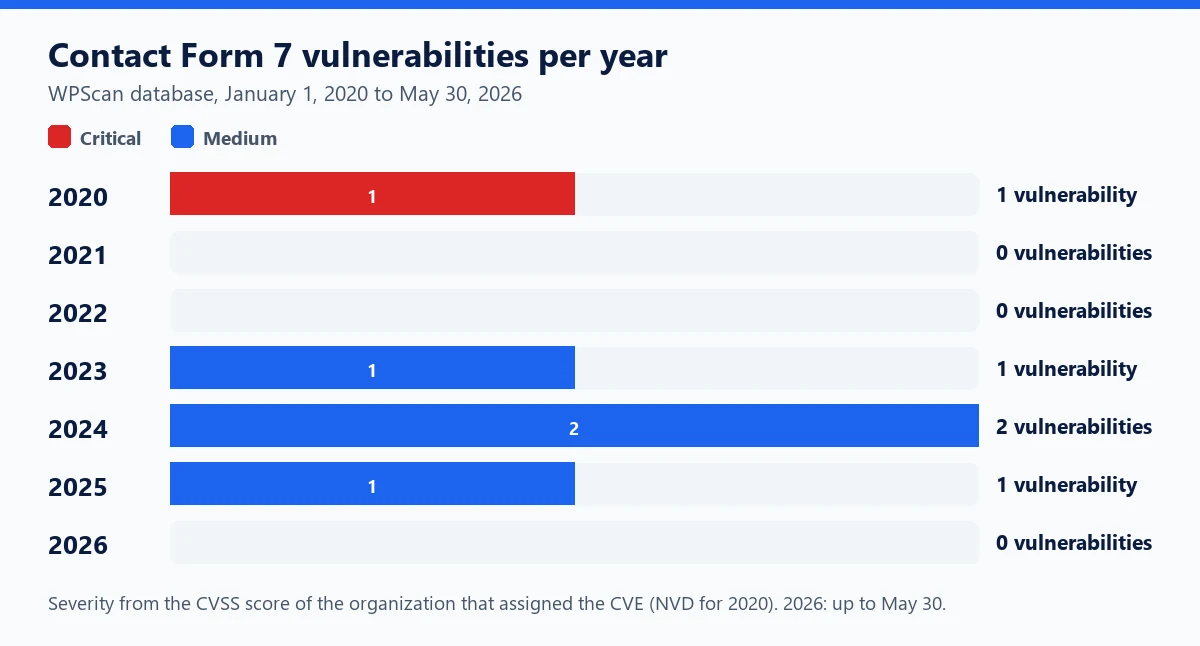
Five vulnerabilities in nearly six and a half years for a plugin installed on more than 10 million sites is few, and two years (2021 and 2022) have none at all. The developer publishes no explanation for this and we will not invent one. We can only note what the code and the advisories show: the plugin focuses on one specific function, uploaded files are protected by several layers, and the two vulnerabilities whose timeline is public were fixed in one and nine days.
A low number does not prove the absence of vulnerabilities, though. It reflects what has been found and published. A vulnerability can exist for years before being discovered, like the 2023 one, present in the name neutralization code long before it was reported. And the ecosystem around Contact Form 7 tells another story: many add-on plugins from other vendors (multiple file uploads, message storage, payments, integrations) have their own vulnerabilities, sometimes unauthenticated, and they are listed separately. A "Contact Form 7" search in a vulnerability database mixes these add-ons with the main plugin: always check the exact name of the affected product.
What this history shows
- Fixes are fast: one day after the report in 2020, nine days in 2023. The main risk therefore does not come from the developer, but from sites that are slow to update.
- Uploaded files remain the weak spot: two vulnerabilities out of five, including the only critical one, concern the same file name neutralization mechanism.
- New features bring new risks: the 2025 vulnerability comes from the Stripe module, absent from early versions.
- The score does not tell everything: the 2024 open redirect is rated 4.3 by WPScan and 6.1 by the NVD. Also look at the account required and the affected feature.
This finding matches that of WordPress core, whose security releases we trace in our WordPress core vulnerability timeline, and the general trends presented in our article on plugin vulnerabilities by the numbers.
Protecting your site
- Update: any version 6.0.6 or later fixes the five vulnerabilities in the table. Check the installed version under Plugins, Installed Plugins.
- Turn on automatic updates for Contact Form 7: its patch releases are frequent and low risk. See our guide to automatic plugin updates.
- Clean up: delete the forms and add-ons you no longer use, as well as any abandoned plugin (abandoned plugins).
- Restrict file upload fields to the types strictly needed (for example
pdf) and block PHP execution inwp-content/uploads. - Add a web application firewall capable of virtual patching to cover the gap between the publication of a vulnerability and your update (WAF comparison).
- Monitor vulnerabilities in all your plugins, not just this one (monitoring plugin vulnerabilities).
WP Feint Pro can help with this last point. Every day, it compares the versions of your installed plugins and themes with the public WPVulnerability.net database and sends you a vulnerability alert by email with the severity and the fixed version. The member area lists pending updates and vulnerable sites (monitoring your sites). WP Feint alerts you; it does not fix plugins and it is not a firewall: updating remains your decisive step. To round out your toolkit, see our selection of the best WordPress security plugins.
Key takeaways
- Five vulnerabilities published for Contact Form 7 from January 1st, 2020 to May 30, 2026, all fixed; only one critical (CVE-2020-35489, fixed in 5.3.2).
- Minimum recommended version: 6.0.6; install the latest.
- File upload is the weak spot: restrict the accepted types and block PHP in
uploads, especially on Nginx. - Contact Form 7 add-ons have their own vulnerabilities: monitor them too.
Sources
- WordPress.org: Contact Form 7 plugin (external link, opens in a new tab)
- NVD: CVE-2020-35489 (December 17, 2020) (external link, opens in a new tab)
- CVE.org: CVE-2023-6449, Contact Form 7 up to 5.8.3, Authenticated (Editor+) Arbitrary File Upload (December 1, 2023) (external link, opens in a new tab)
- NVD: CVE-2024-2242 (March 13, 2024) (external link, opens in a new tab)
Other sources consulted: further CVE records, official vendor pages, security research publications, WPScan and Patchstack databases.