
In PHP, the include and require statements (and their _once variants) load a file and run the code it contains. They are used everywhere, for example to load a theme template. The danger arises when the file path depends on data sent by the visitor without sufficient validation. MITRE's catalog lists this weakness as CWE-98, with two common names: RFI for remote inclusion, LFI for local inclusion.
How the attack works
Code like this lets the visitor choose which file gets loaded:
// Don't do this
include( __DIR__ . '/templates/' . $_GET['view'] . '.php' );- LFI (Local File Inclusion): with
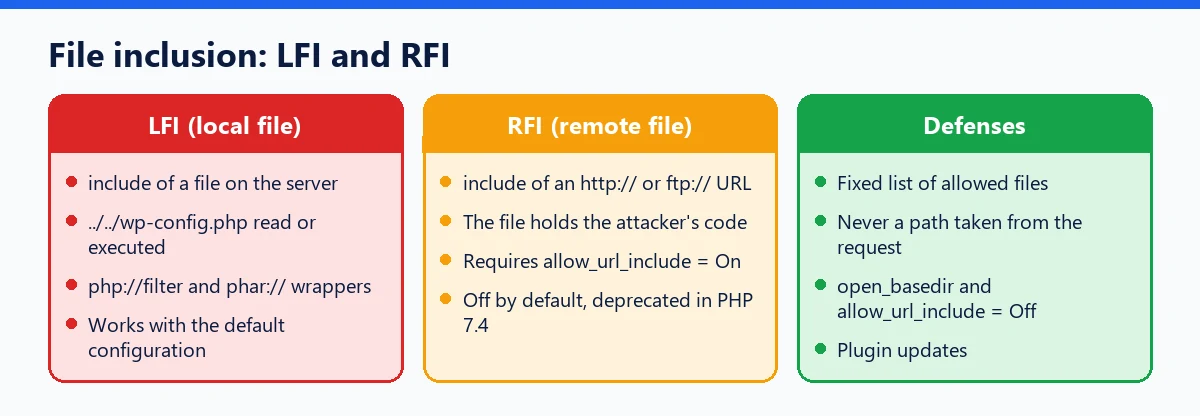
../sequences, the attacker climbs up the directory tree and gets a file that already exists on the server loaded. At best, they read a file they shouldn't see; if they manage to include a file whose content they control (a log, an uploaded file), they get remote code execution. - RFI (Remote File Inclusion): the attacker supplies a URL pointing to their own server, and PHP includes their code directly. It is the most direct form, but it requires a setting that is rarely enabled.
The role of PHP configuration
The PHP documentation is clear about two directives:
allow_url_includeallows URLs inincludeandrequire. It defaults to0, can only be changed in the system configuration (php.ini) and has been deprecated since PHP 7.4.0. It also requiresallow_url_fopento be enabled.allow_url_fopenlets PHP open URLs as if they were files; it is enabled by default, because many scripts need it.
Disabling RFI doesn't solve everything: PHP wrappers such as php://filter can turn some LFI flaws into code execution on a default configuration, and phar:// was long used to trigger insecure deserialization. Our article on the php://filter and phar wrappers covers these techniques in detail.
How to protect against it
The best defense, recommended by MITRE, is to never build a path from received data, but to map fixed values to known files:
$views = array( 'list' => 'list.php', 'grid' => 'grid.php' );
$view  = isset( $views[ $_GET['view'] ?? '' ] ) ? $views[ $_GET['view'] ] : 'list.php';
include __DIR__ . '/templates/' . $view;- Keep included files outside the web root when possible.
- Limit what PHP can read with
open_basedir: a hijacked include won't be able to leave the allowed directories. Hardening PHP on your hosting explains this setting and its effects. - A web application firewall blocks typical patterns (
../,php://), as an extra layer only.
For WordPress
WordPress core doesn't build its includes from visitor parameters: the risk comes from plugins and themes that load a template, a language file or a module based on a URL or AJAX parameter. The favorite LFI target is wp-config.php, which holds the database credentials and the security keys; a sensitive file forgotten in the web root, such as a .env file or a backup, is another easy catch, as our article on exposed sensitive files shows. Finally, check that your host keeps allow_url_include disabled.