A vulnerability rated 9.1 out of 10 by Wordfence in the Blocksy Companion plugin, installed on more than 300,000 sites, lets an unauthenticated visitor create a Dokan vendor account and be logged into it automatically, even when vendor registration is closed. In practice it only affects stores that also run WooCommerce and Dokan, and version 2.1.59 has fixed it since October 8. Here is who needs to act, how to check that no ghost vendor has been created, and why vulnerability databases disagree on the severity.
What happened
On October 8, 2026 at 4:35 p.m. (Paris time), Wordfence notified Creative Themes, the developer of the Blocksy theme and its companion plugin, of a vulnerability found by researcher Sawyer. The same day, the developer released Blocksy Companion 2.1.59, whose changelog opens with an unambiguous line: "Account modal, respect Dokan vendor registration setting".
Wordfence disclosed the vulnerability on October 9 at 5:15 p.m., with a CVSS score of 9.1, critical severity. WPScan and Patchstack added it to their databases the same day. The identifier CVE-2026-107645 was published on cve.org on October 10 at 5:26 a.m., then picked up by the NVD (the US National Vulnerability Database) at 6:18 a.m. On October 11, the SSVC analysis by CISA, the US cybersecurity agency, read "exploitation: none", but also "automatable: yes". Version 2.1.60, released on October 15, adds further validation hardening.
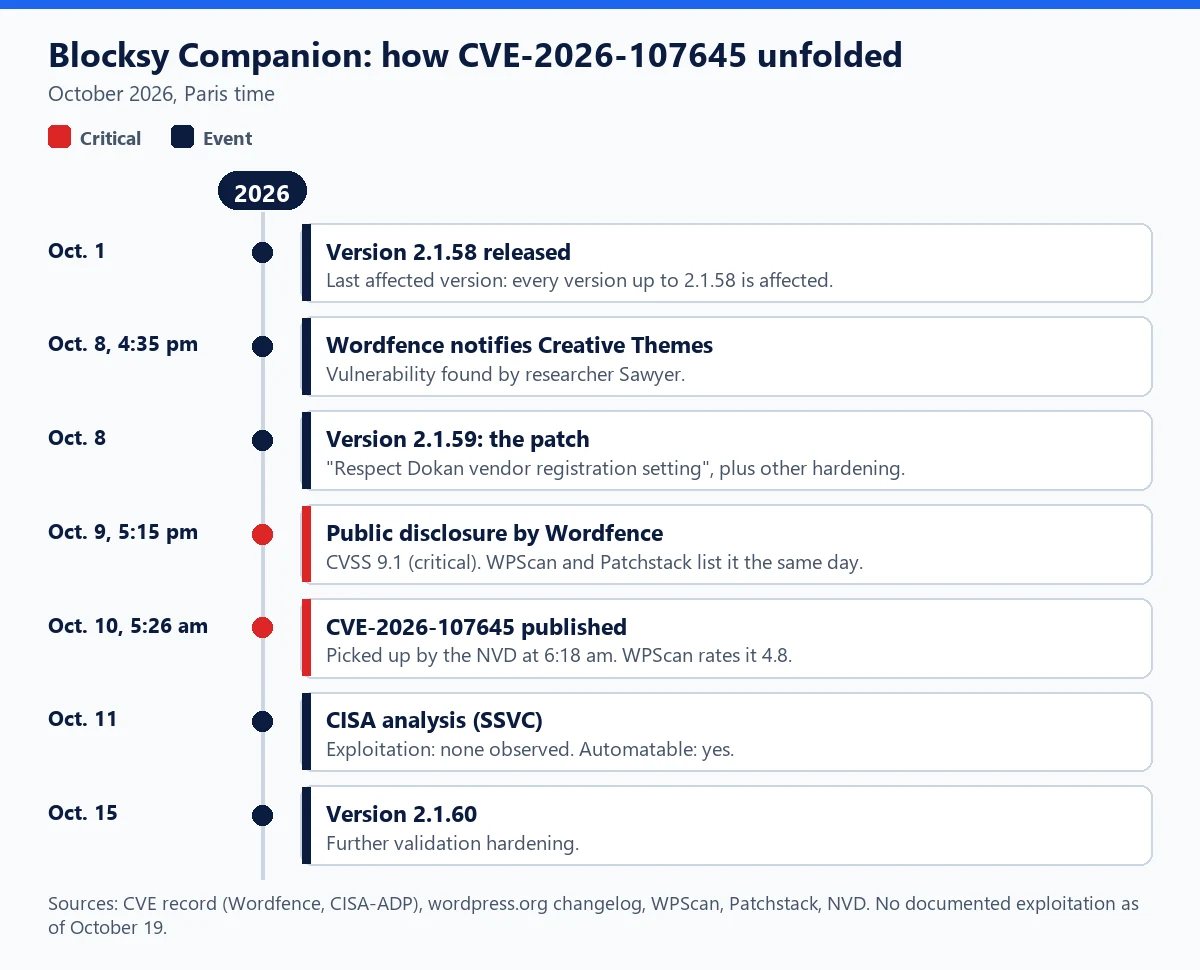
As of October 19, no recognized source documents any attack exploiting this vulnerability. It is the third vulnerability disclosed in Blocksy Companion since late August, after an XSS limited to authors (fixed in 2.1.52) and broken access control (fixed in 2.1.56): the full history of Blocksy and Blocksy Companion vulnerabilities puts these episodes in perspective.
Who is affected
Blocksy Companion is the free plugin that goes with the Blocksy theme: starter sites, WooCommerce extensions, a login and registration modal in the header. It has more than 300,000 active installations (wordpress.org). All versions up to and including 2.1.58 are affected. But the vulnerability only has an effect if three conditions are met:
- Dokan is active. Dokan is the plugin that turns WooCommerce into a multivendor marketplace; its free version has more than 30,000 active installations (wordpress.org). Without Dokan, the "seller" role does not exist and the request leads nowhere.
- WooCommerce is active and registration is open on the My account page (WooCommerce, Settings, Accounts & Privacy). Based on our reading of the version 2.1.58 code, the vendor is only created through this WooCommerce registration mode.
- Blocksy Companion is version 2.1.58 or earlier. The entry point exists whether or not the account modal is shown in the header.
A brochure site or a blog running Blocksy without Dokan is therefore not exposed to this specific vulnerability, even though it should be updated like any other. The advisories only cite the free plugin distributed on wordpress.org; the developer has said nothing about Blocksy Companion Pro, which is best updated too.
| Database | Published | Affected versions | Fixed in | CVSS | Displayed severity |
|---|---|---|---|---|---|
| Wordfence (CNA, issued the CVE) | October 9, 2026 | up to 2.1.58 | 2.1.59 | 9.1 | Critical |
| Patchstack | October 9, 2026 | up to 2.1.58 | 2.1.59 | 9.1 | "Low" patch priority |
| WPScan | October 9, 2026 (added on the 10th) | before 2.1.59 | 2.1.59 | 4.8 | Medium |
| NVD | October 10, 2026 | up to 2.1.58 | 2.1.59 | 9.1 (Wordfence score) | No NVD score of its own |
9.1 or 4.8: why the databases disagree
Wordfence assigns the maximum exploitability score: a remote, simple attack, with no account and no victim action, and a high impact on confidentiality and integrity. That score describes the worst case, a site where Dokan is installed. WPScan shows 4.8 without publishing the details of its calculation, and its entry states that the vulnerability has not been verified by its team. Neither database explains the gap; presumably WPScan takes into account the conditions (Dokan required) and the fact that the account obtained is not an administrator. Patchstack uses 9.1 while ranking the patch as "low" priority. Our reading: for a site without Dokan, the risk is zero; for a Dokan marketplace, the Wordfence score is the right reference.
How the vulnerability works
Blocksy offers a login and registration modal that opens from the header. To create the account, it sends an AJAX request named blc_implement_user_registration, open to logged-out visitors, which is normal for a registration form. The problem comes down to two lines of code.
First, to make registration work with Dokan, Companion disabled Dokan's security token (nonce) check through the dokan_register_nonce_check filter. But Dokan interprets that disabled filter as a sign that the request comes from its own vendor registration form: it then allows the "seller" role, even if the administrator has closed vendor registration. Second, Companion read the role field sent by the visitor and, if it was "seller", logged the new account in immediately. The result, according to Wordfence: an unauthenticated attacker gets a Dokan vendor account that is already logged in.
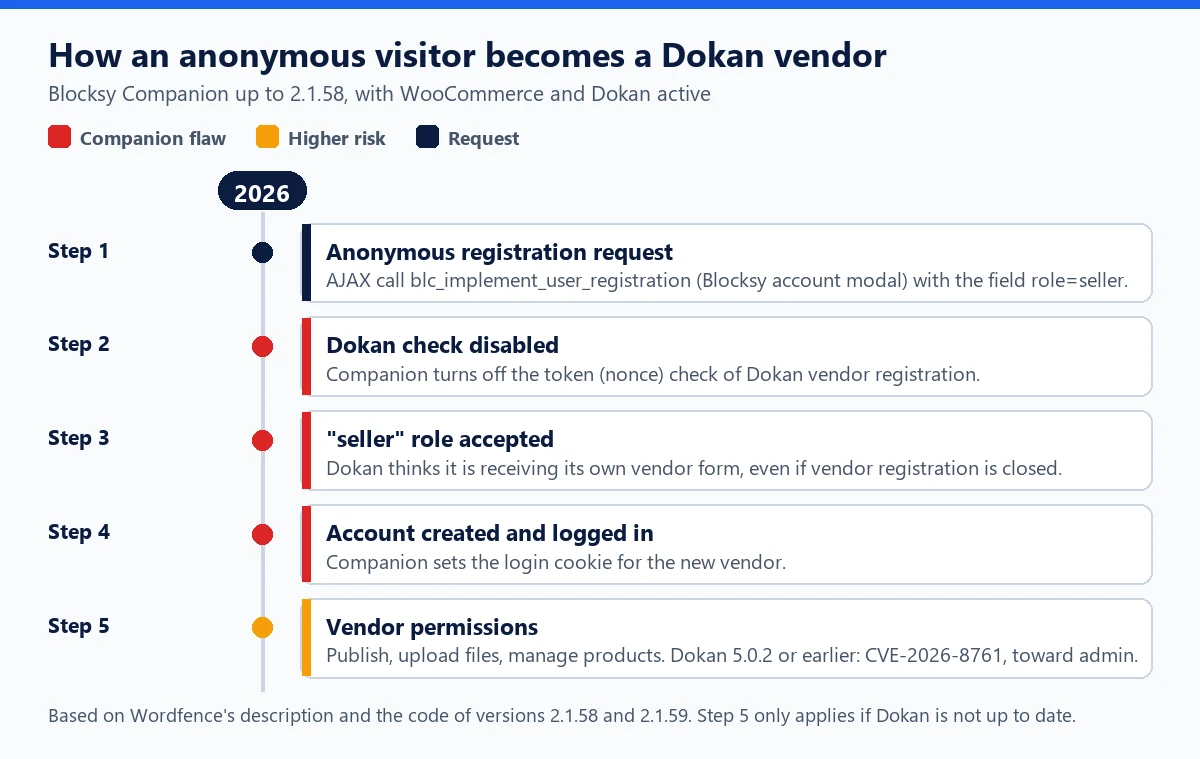
A vendor is not an administrator, but it is not a mere customer either. In Dokan's code, the "seller" role can publish and edit posts, upload files to the Media Library, moderate comments and manage its products. On a marketplace, such an account could be used to publish fake product listings or misleading content under the site's name.
The risk climbs if Dokan is not up to date. In August 2026, Wordfence published CVE-2026-8761 (CVSS 8.8): in Dokan up to 5.0.2, a vendor account could modify any user, including an administrator's password, through the Dokan REST API. The fix arrived in 5.0.3. On a site combining Companion 2.1.58 and an old Dokan, an anonymous visitor could therefore chain the two vulnerabilities all the way to a takeover.
Version 2.1.59 removes the disabling of Dokan's check and generates a valid token on the server side, so Dokan once again applies its own vendor registration setting. Automatic login of a vendor no longer depends on the field sent by the visitor, but on the role actually assigned to the account. On a site where vendor registration is open to everyone, anyone can become a vendor anyway: the vulnerability mostly changes things for marketplaces that had closed or restricted it.
Checking your site
No advisory has published indicators of compromise (IP address, file, account name). Checking therefore relies on what the vulnerability produces: vendor accounts you did not approve. Start with the installed versions:
wp plugin list --fields=name,version,status --name=blocksy-companion
wp plugin list --fields=name,version,status --name=dokan-lite
wp plugin verify-checksums blocksy-companion
Then list vendors and their registration dates, followed by administrators:
wp user list --role=seller --fields=ID,user_login,user_email,user_registered --orderby=user_registered --order=DESC
wp user list --role=administrator --fields=ID,user_login,user_email,user_registered- If vendor registration is closed on your site, any recently created vendor that did not go through you is suspicious.
- For a doubtful account, look at what it published or uploaded:
wp post list --author=ID --post_type=any --fields=ID,post_type,post_title,post_date. - An unknown administrator, or an administrator password changed for no reason, should make you think of the chain with CVE-2026-8761 if Dokan was 5.0.2 or earlier: in that case, move on to the cleanup procedure.
- In server logs, the request targets
/wp-admin/admin-ajax.phpwith POST; the action name and therolefield are in the request body, which access logs usually do not record.
What to do now
- Update Blocksy Companion to 2.1.59 at least, ideally to 2.1.60 (the latest version as of October 19):
wp plugin update blocksy-companion. Also update Blocksy Companion Pro if you use it. - Update Dokan, at least to 5.0.3 to close CVE-2026-8761.
- Delete or suspend unapproved vendors, after checking their content and files.
- If a suspicious administrator shows up: delete it, change administrator passwords, revoke application passwords, regenerate the keys in
wp-config.php(wp config shuffle-salts, which logs everyone out), then scan the files and restore a clean backup if needed. Follow our procedure for cleaning up a hacked WordPress site.
Reducing exposure next time
This episode shows that the patch is often available before the vulnerability is known: here, one day earlier. Sites whose plugins update automatically could receive 2.1.59 even before the disclosure. A few habits limit exposure:
- Turn on automatic plugin updates, at least for well-maintained free plugins like Blocksy Companion.
- Monitor vulnerabilities in your plugins, not just updates: knowing that a vulnerability targets a combination of plugins (here Companion and Dokan) helps you decide how urgent it is.
- Review accounts and their roles regularly, applying least privilege, and close registrations you do not use.
- Keep tested backups, and consider a web application firewall with virtual patching to cover the delay between disclosure and update.
WP Feint Pro can help you spot this kind of situation, without fixing it for you. Its vulnerability alerts compare the installed versions of wordpress.org plugins and themes, including Blocksy Companion and Dokan, with the public WPVulnerability.net database every day, and notify you by email as soon as a vulnerability is listed there, along with the fixed version. The admin activity log records account creations and role changes from the moment it is activated, which brings an unexpected administrator to light; it does not see what bypasses WordPress. The integrity check only verifies WordPress core files: it does not detect a vendor added through this vulnerability. Finally, the member area brings together the pending updates and vulnerable sites of all your sites. WP Feint alerts: it does not update anything and it is not a firewall.
Key takeaways
- CVE-2026-107645 affects Blocksy Companion up to 2.1.58: an unauthenticated visitor can become a Dokan vendor and be logged in automatically.
- Only sites with WooCommerce and Dokan active are exposed; Wordfence rates the vulnerability 9.1, WPScan 4.8.
- Patch: 2.1.59, released on October 8, 2026, before the October 9 disclosure; 2.1.60 came out on October 15.
- No documented exploitation as of October 19; check recent vendor accounts and update Dokan too (5.0.3 at least).
Sources
- CVE.org: CVE-2026-107645, Blocksy Companion (October 10, 2026) (external link, opens in a new tab)
- WordPress.org Trac: Blocksy Companion, changeset 3735192, fix to account-auth.php (October 8, 2026) (external link, opens in a new tab)
- WordPress.org: Dokan, plugin page and active installations (external link, opens in a new tab)
- CVE.org: CVE-2026-8761, Dokan, privilege escalation from a vendor account (August 5, 2026) (external link, opens in a new tab)
Other sources consulted: further CVE records, official vendor pages, Wordfence, WPScan and Patchstack databases.