{
"title": "Hotlinking",
"seo_title": "Hotlinking: definition, risks and WordPress protection",
"h1": "Hotlinking",
"description": "Hotlinking: how other sites display your images using your bandwidth, and how to detect and block it on Apache, Nginx or a CDN.",
"lead": "Hotlinking (or direct linking) means displaying on one site an image, video or file hosted on another site, by pointing straight to its URL instead of copying it. Every view is then served by the original server, which pays for the bandwidth and load without getting any benefit from the visit.",
"language": "en",
"locale": "en-US",
"type": "definition",
"url": "https://www.wp-feint.com/glossary/hotlinking/",
"canonical": "https://www.wp-feint.com/glossary/hotlinking/",
"markdown": "https://www.wp-feint.com/glossary/hotlinking/index.md",
"json": "https://www.wp-feint.com/glossary/hotlinking/index.json",
"published": "2026-10-28T08:00:00+00:00",
"modified": "2026-11-22T12:07:31+00:00",
"site": {
"name": "WP Feint",
"url": "https://www.wp-feint.com/"
},
"translations": [
{
"language": "en",
"hreflang": "en-US",
"title": "Hotlinking",
"url": "https://www.wp-feint.com/glossary/hotlinking/",
"markdown": "https://www.wp-feint.com/glossary/hotlinking/index.md",
"json": "https://www.wp-feint.com/glossary/hotlinking/index.json"
},
{
"language": "fr",
"hreflang": "fr-FR",
"title": "Hotlinking",
"url": "https://www.wp-feint.com/fr/definitions/hotlinking/",
"markdown": "https://www.wp-feint.com/fr/definitions/hotlinking/index.md",
"json": "https://www.wp-feint.com/fr/definitions/hotlinking/index.json"
},
{
"language": "es",
"hreflang": "es-ES",
"title": "Hotlinking",
"url": "https://www.wp-feint.com/es/glosario/hotlinking/",
"markdown": "https://www.wp-feint.com/es/glosario/hotlinking/index.md",
"json": "https://www.wp-feint.com/es/glosario/hotlinking/index.json"
},
{
"language": "de",
"hreflang": "de-DE",
"title": "Hotlinking",
"url": "https://www.wp-feint.com/de/glossar/hotlinking/",
"markdown": "https://www.wp-feint.com/de/glossar/hotlinking/index.md",
"json": "https://www.wp-feint.com/de/glossar/hotlinking/index.json"
},
{
"language": "it",
"hreflang": "it-IT",
"title": "Hotlinking",
"url": "https://www.wp-feint.com/it/glossario/hotlinking/",
"markdown": "https://www.wp-feint.com/it/glossario/hotlinking/index.md",
"json": "https://www.wp-feint.com/it/glossario/hotlinking/index.json"
},
{
"language": "pt",
"hreflang": "pt-BR",
"title": "Hotlinking",
"url": "https://www.wp-feint.com/pt/glossario/hotlinking/",
"markdown": "https://www.wp-feint.com/pt/glossario/hotlinking/index.md",
"json": "https://www.wp-feint.com/pt/glossario/hotlinking/index.json"
},
{
"language": "nl",
"hreflang": "nl-NL",
"title": "Hotlinking",
"url": "https://www.wp-feint.com/nl/woordenlijst/hotlinking/",
"markdown": "https://www.wp-feint.com/nl/woordenlijst/hotlinking/index.md",
"json": "https://www.wp-feint.com/nl/woordenlijst/hotlinking/index.json"
}
],
"headings": [
{
"level": 1,
"text": "Hotlinking"
},
{
"level": 2,
"text": "How hotlinking works"
},
{
"level": 2,
"text": "Why it matters"
},
{
"level": 2,
"text": "How to prevent it"
},
{
"level": 2,
"text": "For WordPress"
}
],
"body": "To illustrate a page, the easiest shortcut is to paste the URL of an image found elsewhere: ` `. The image shows up on the other site, but it's your server that sends it, to every one of its visitors. The Apache documentation describes the practice as using your bandwidth to serve content on someone else's site.\n\n## How hotlinking works\n\nWhen a browser loads an image, it usually states the page containing it in the `Referer` HTTP header. MDN explains that this header may contain the origin, path and query string of the page, depending on the referrer policy in effect. That's what makes it possible to recognize requests coming from other sites.\n\n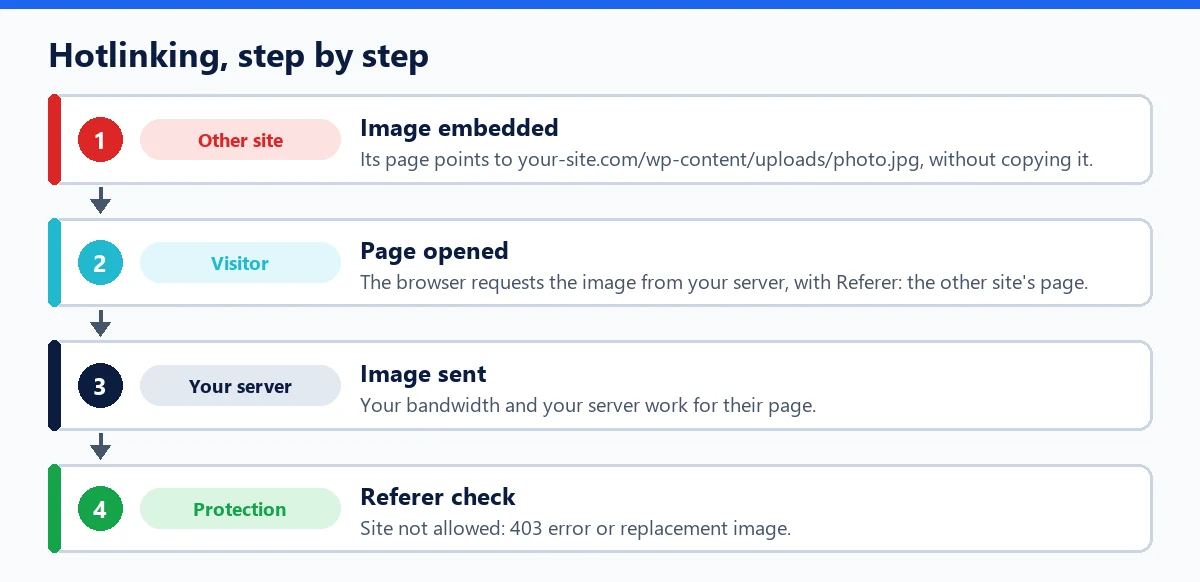\n\n## Why it matters\n\n- **Bandwidth and server load**: a photo reused on a high-traffic page multiplies the requests to your hosting, which hurts on a capped plan or one billed by traffic.\n- **Use of your visuals**: your work illustrates someone else's site, often without permission or a link back to you.\n- **Reputation risk**: your file can appear on a shady site, and any change on your end shows up there too.\n\n## How to prevent it\n\nProtection relies on the Referer header, with two limitations the Apache and Nginx docs point out: it's optional, so some browsers or privacy settings don't send it, and it's easy to fake. So you have to let requests without a Referer through, and treat this protection as a brake on everyday hotlinking, not as a security measure.\n\nOn Apache, in an [.htaccess](https://www.wp-feint.com/glossary/htaccess/) file, the documentation offers a simple rule:\n\n```\nSetEnvIf Referer example\\.com localreferer\n\n Require env localreferer\n\n```\n\nAs written, this rule also rejects requests without a Referer; the mod_rewrite variant on the same page lets them through and can serve a replacement image. On Nginx, in the [server block](https://www.wp-feint.com/glossary/nginx-conf/), the referer module does the sorting:\n\n```\nlocation ~* \\.(jpe?g|png|gif|webp|avif)$ {\n valid_referers none blocked server_names *.example.com;\n if ($invalid_referer) { return 403; }\n}\n```\n\nBehind a [CDN](https://www.wp-feint.com/glossary/cdn/), images served from its cache never reach your server: protection has to be turned on in the CDN itself, such as Cloudflare's Hotlink Protection.\n\n*Video: “What is Hotlinking and How to Prevent It (on Apache and Nginx)” (Tony Teaches Tech)*\n\n## For WordPress\n\nBlocking blindly can make your images vanish from Google Images or from link previews on social networks, which bring you visitors. Start by observing. WP Feint Pro offers [image hotlink detection](https://www.wp-feint.com/features/image-hotlink-protection/) for this: in Detect mode, it lists the sites displaying your images, with the number of requests and the estimated bandwidth, without blocking anything; in Protect mode, it returns a “Protected image” picture, a transparent pixel or a 403 error, while always letting through your own site, requests without a Referer, search engines and social networks. It writes its rules to .htaccess on Apache and LiteSpeed, and provides the block to copy on Nginx. Like any protection of this kind, it doesn't see images served by a CDN, or copies of images hosted elsewhere.\n\nThe effects on image SEO are covered in our article on [masking and its real effects on SEO](https://www.wp-feint.com/hide-wordpress-seo-impact/).\n\n## Related terms\n\n- [htaccess file (.htaccess)](https://www.wp-feint.com/glossary/htaccess/)\n- [nginx.conf](https://www.wp-feint.com/glossary/nginx-conf/)\n- [CDN](https://www.wp-feint.com/glossary/cdn/)\n- [HTTP security headers](https://www.wp-feint.com/glossary/http-security-headers/)\n\n\n## Sources\n\n- [Apache HTTP Server : When not to use mod_rewrite (image hotlinking)](https://httpd.apache.org/docs/2.4/rewrite/avoid.html)\n- [nginx : Module ngx_http_referer_module](https://nginx.org/en/docs/http/ngx_http_referer_module.html)\n- [MDN : Referer](https://developer.mozilla.org/en-US/docs/Web/HTTP/Reference/Headers/Referer)",
"definition": "Hotlinking (or direct linking) means displaying on one site an image, video or file hosted on another site, by pointing straight to its URL instead of copying it. Every view is then served by the original server, which pays for the bandwidth and load without getting any benefit from the visit.",
"group": "Web hosting",
"aka": [
"hot-linking",
"inline linking",
"direct linking",
"bandwidth theft",
"hotlink protection"
],
"related": [
{
"title": "htaccess file (.htaccess)",
"url": "https://www.wp-feint.com/glossary/htaccess/",
"markdown": "https://www.wp-feint.com/glossary/htaccess/index.md"
},
{
"title": "nginx.conf",
"url": "https://www.wp-feint.com/glossary/nginx-conf/",
"markdown": "https://www.wp-feint.com/glossary/nginx-conf/index.md"
},
{
"title": "CDN",
"url": "https://www.wp-feint.com/glossary/cdn/",
"markdown": "https://www.wp-feint.com/glossary/cdn/index.md"
},
{
"title": "HTTP security headers",
"url": "https://www.wp-feint.com/glossary/http-security-headers/",
"markdown": "https://www.wp-feint.com/glossary/http-security-headers/index.md"
}
],
"sources": [
{
"title": "Apache HTTP Server : When not to use mod_rewrite (image hotlinking)",
"url": "https://httpd.apache.org/docs/2.4/rewrite/avoid.html"
},
{
"title": "nginx : Module ngx_http_referer_module",
"url": "https://nginx.org/en/docs/http/ngx_http_referer_module.html"
},
{
"title": "MDN : Referer",
"url": "https://developer.mozilla.org/en-US/docs/Web/HTTP/Reference/Headers/Referer"
}
],
"format": "application/json"
}