---
title: "Fingerprinting"
description: "Fingerprinting identifies the CMS, its version and its plugins. The clues bots read, WordPress examples and the limits of hiding them."
language: "en"
locale: "en-US"
type: "definition"
canonical: "https://www.wp-feint.com/glossary/fingerprinting/"
published: "2026-10-28T08:00:00+00:00"
modified: "2026-11-22T12:07:22+00:00"
translations:
en-US: "https://www.wp-feint.com/glossary/fingerprinting/index.md"
fr-FR: "https://www.wp-feint.com/fr/definitions/fingerprinting/index.md"
es-ES: "https://www.wp-feint.com/es/glosario/fingerprinting/index.md"
de-DE: "https://www.wp-feint.com/de/glossar/fingerprinting/index.md"
it-IT: "https://www.wp-feint.com/it/glossario/fingerprinting/index.md"
pt-BR: "https://www.wp-feint.com/pt/glossario/fingerprinting/index.md"
nl-NL: "https://www.wp-feint.com/nl/woordenlijst/fingerprinting/index.md"
---
# Fingerprinting
Fingerprinting means identifying the software that runs a website, its version and its components from visible clues: HTTP headers, the generator tag, file paths, cookies. Bots use it to pick which known vulnerabilities to try on each site.
Fingerprinting is almost always the first step of an automated attack. Before trying anything, a bot wants to know what it is dealing with: WordPress, Joomla! or Drupal, which version, which plugins. This sorting lets it choose, from its list of known vulnerabilities, the ones with a chance of working, and skip sites that don't match. The OWASP Web Security Testing Guide (WSTG) devotes a separate chapter of the information gathering phase to it.
## How fingerprinting works
Detection tools compare what the site returns with a database of signatures. OWASP mentions several families of clues:
- **HTTP headers**, such as `X-Powered-By` or `X-Generator`;
- **cookies**, whose name often gives away the software (`wordpress_logged_in_…`);
- **the HTML code**: comments, the `` tag, software-specific paths;
- **well-known files and folders**, tested one by one;
- **error messages** that reveal paths or the platform.
Tools such as WhatWeb, Wappalyzer and WPScan automate this work. A bot needs only a few requests to classify a site.
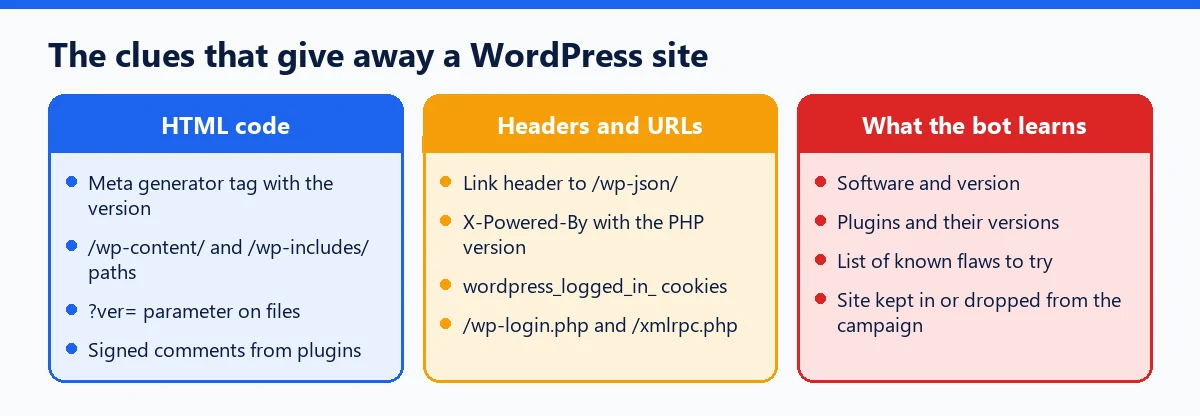
## Examples on WordPress
A standard WordPress site is recognized very quickly. The `get_the_generator()` function outputs the `` tag in pages and an equivalent in RSS and Atom feeds, version included. Stylesheets and scripts carry the `/wp-content/` and `/wp-includes/` paths followed by a `?ver=` parameter. The `Link` header announces the REST API, and many SEO, caching and page builder plugins sign the page code with a comment that gives their name and version. Our article [on how bots and Wappalyzer recognize WordPress](https://www.wp-feint.com/wordpress-fingerprinting-detection/) reviews these signatures one by one.
*Video: “Fingerprint Web Apps & Servers for Better Recon [Tutorial]” (Null Byte)*
## How to reduce your fingerprint
- Remove the generator tag and the [HTML comments left by plugins](https://www.wp-feint.com/html-comments-generator-tag-wordpress/).
- Remove `X-Powered-By` (`expose_php = Off` in PHP) and make the `Server` header less talkative, as OWASP recommends for [response headers](https://www.wp-feint.com/glossary/http-security-headers/).
- Remove unnecessary technical links (RSD, shortlinks) and close the URLs you don't use, such as [XML-RPC](https://www.wp-feint.com/glossary/xml-rpc/).
Stay clear-eyed: OWASP files these measures under security through obscurity. They slow down the least sophisticated bots and reduce noise, but a determined attacker eventually identifies the software. They complement updates without ever replacing them: a vulnerable plugin stays vulnerable, whether it is visible or not. The article [Hiding WordPress: what it does and what it doesn't](https://www.wp-feint.com/hiding-wordpress-benefits-limits/) sorts it all out.
## For WordPress
WP Feint targets exactly these clues. The free version removes the WordPress mention, the comments and generator tags of known plugins and some [technical links](https://www.wp-feint.com/features/wordpress-technical-links/); it can also [make the site pass for another CMS](https://www.wp-feint.com/features/cms-imitation/), so that bots try attacks that have no target there. The plugin's guide spells out its limits: the imitation adds the best-known clues of the announced software, it doesn't reproduce it in full, and a header may be missing on a page served by an upstream cache.
## Related terms
- [HTTP security headers](https://www.wp-feint.com/glossary/http-security-headers/)
- [XML-RPC](https://www.wp-feint.com/glossary/xml-rpc/)
- [Honeypot](https://www.wp-feint.com/glossary/honeypot/)
- [CVE](https://www.wp-feint.com/glossary/cve/)
- [User enumeration](https://www.wp-feint.com/glossary/user-enumeration/)
## Sources
- [OWASP WSTG : Fingerprint Web Application Framework](https://wstg.owasp.org/latest/4-Web_Application_Security_Testing/01-Information_Gathering/08-Fingerprint_Web_Application_Framework)
- [WordPress Developer Resources : get_the_generator()](https://developer.wordpress.org/reference/functions/get_the_generator/)
- [OWASP : HTTP Security Response Headers Cheat Sheet](https://cheatsheetseries.owasp.org/cheatsheets/HTTP_Headers_Cheat_Sheet.html)